new
 new
newPachca for Android v2.73
Voice messages
Say it out loud and read the reply. Voice messages now come with automatic transcripts, playback speed controls and drafts.
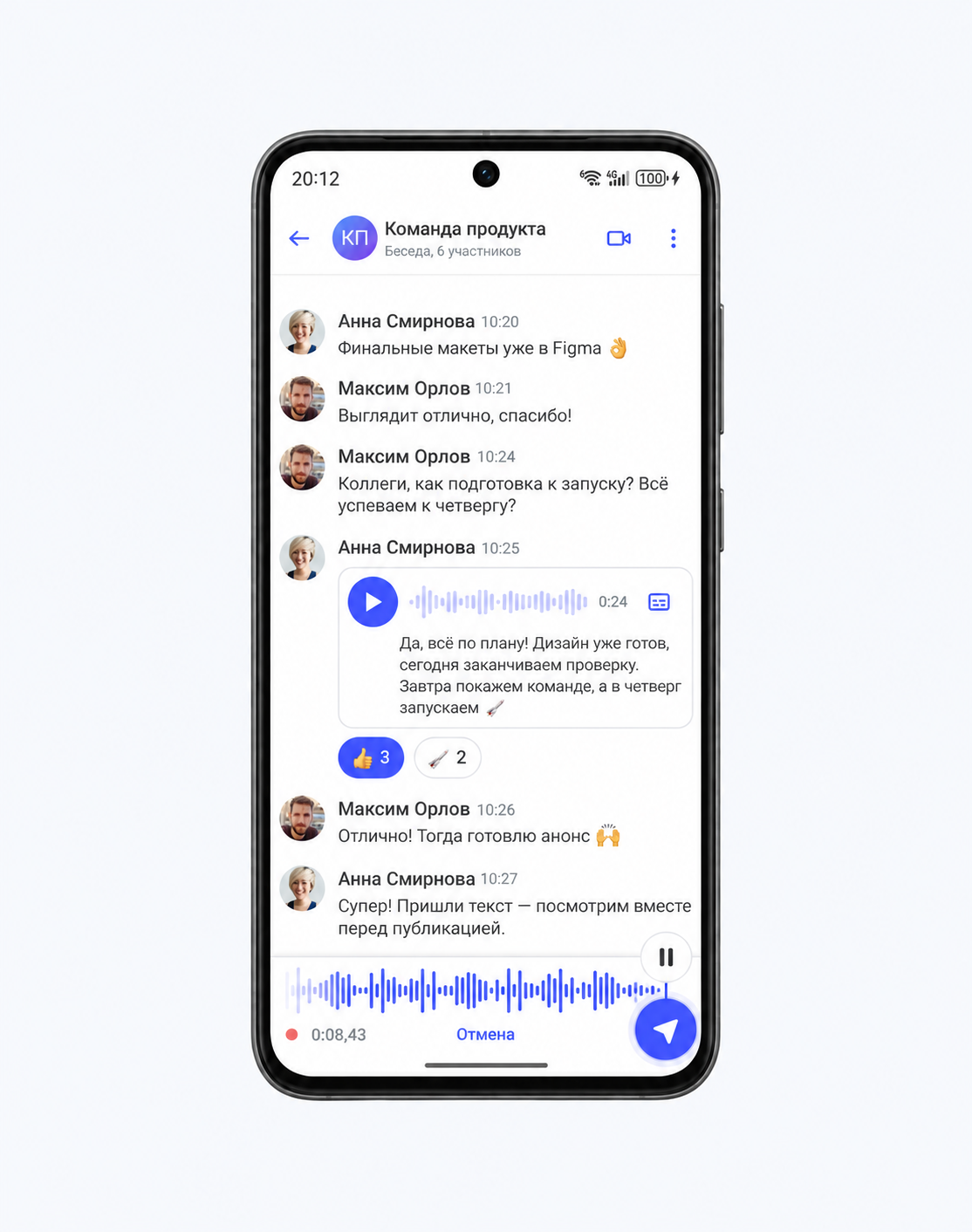
Voice messages have all the features you'd expect:
- Automatic transcripts for when you can't listen.
- 1.5× and 2× playback, with your preferred speed saved.
- Pause and resume recording, then listen and trim before sending.
- Recordings stay in drafts when you switch to another chat.
- Scheduled sending: record now, send later.
- Up to 30 minutes per message.
Log in with a QR code
You can now log in to Pachca on your phone without entering your email or a code. Open Pachca on your computer, go to Personal settings → Account → Log in with a QR code and scan the code in the app.
A redesigned More screen
We redesigned More and the lists throughout the app. Support now has its own section with a "Report a bug" button, making it easier to find.
See active video calls in your chat list
When a video call is in progress, you'll see it right in the chat list on the home screen.
Other improvements
- You can now choose whether Enter sends a message.
- Fixed an issue where the send button could stop responding.
- Thread notification icons now update to show the latest sender. Chats without an image use an avatar with letters and a background color in notifications.
- Your selected folder is kept when you create a chat. You can once again delete folders on the new home screen.