Pachca × n8n automation: Vacation requests
How to build a bot that collects vacation requests automatically with n8n and Pachca forms
The Pachca node for n8n with setup, operations and workflow examples
Automating vacation requests is one of the most popular tasks for HR teams. With n8n and Pachca forms, you can build a bot that collects requests from employees in a consistent format and sends them to an HR chat for quick review.
Step 1. Deploy n8n and set up the Pachca extension
We covered how to do this in detail here.
If you don't have the resources to deploy a self-hosted version of n8n, you can also find Pachca in the web version. We were recently published there officially. Learn more here.
Step 2. The logic and a video demo
We recommend mapping this out first, so it's easier to see and check whether you're heading in the right direction. Here's the logic we settled on:
-
An employee sends the
/startcommand to the Vacation bot in a direct message -
The bot replies with a "Vacation request" button
-
Clicking the button opens a form with the relevant fields
-
Once the form is filled out:
- The bot posts a message in the thread of the starting message saying the request has been sent for review
- The request itself is sent to the HR chat
-
HR can use buttons to approve, reject or ask for more details on the request
-
When any of the buttons is clicked, a status update arrives in the thread under the starting message in the direct messages with the employee, @mentioning the employee, HR and managers. This keeps the whole discussion history in one place
Step 3. Create a bot in Pachca
-
Create a bot for multiple chats and give it a name
-
Make the bot public so employees can message it directly
-
On the Outgoing webhook tab, enter the Production URL from the Webhook settings in n8n
-
Choose which events should trigger the outgoing webhook:
- New messages
- Button clicks
-
Which new messages:
- Starting with commands (in our bot,
/start) - Any
- Starting with commands (in our bot,
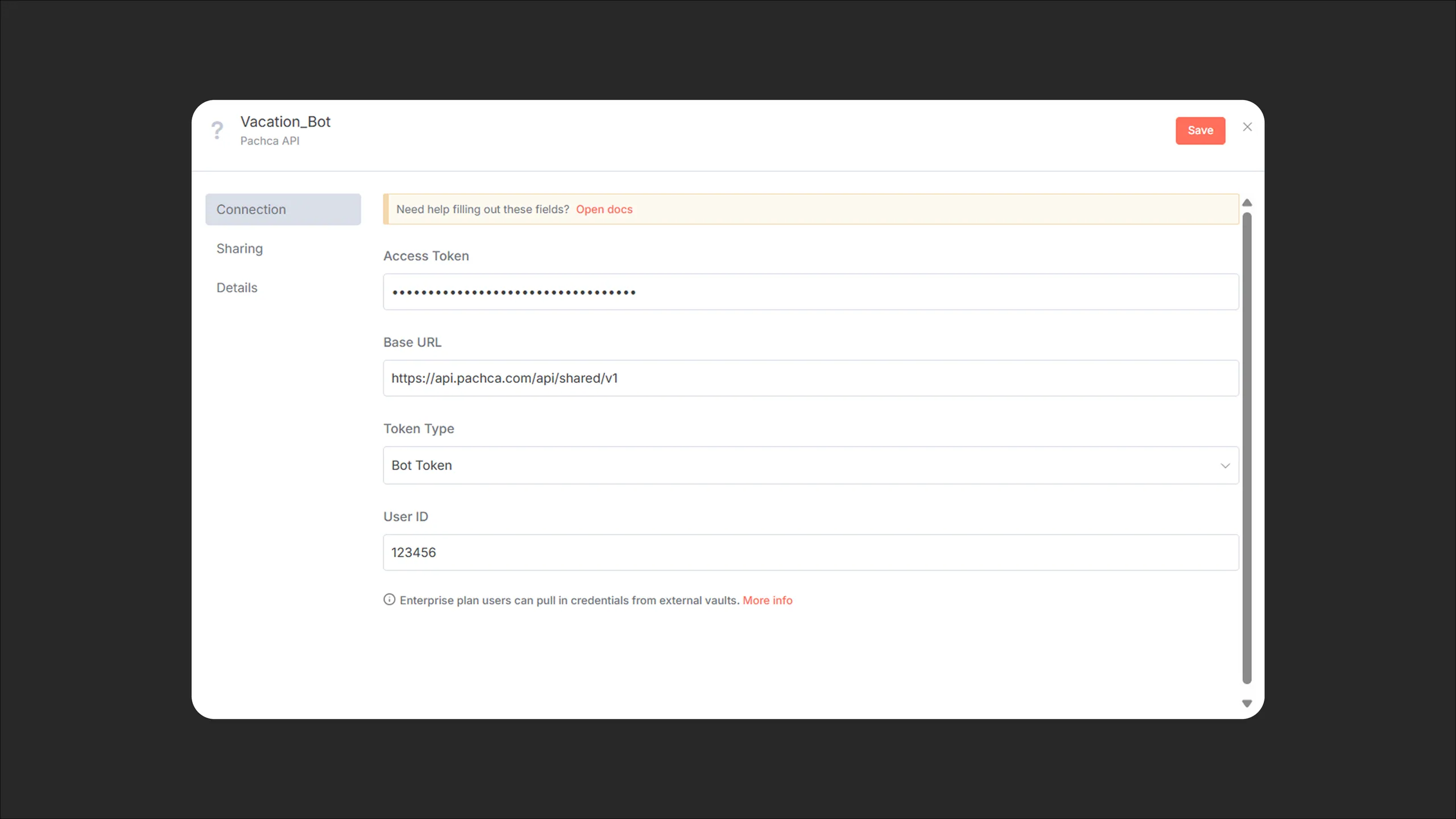
Step 4. Add a New Credential in n8n
-
Access token: your bot's token (available in the bot settings)
-
In Base URL, enter
https://api.pachca.com/api/shared/v1 -
Token type: Bot Token
-
User ID: your bot's user_id (available in the bot settings)
Step 5. Ready-made automation JSON
Download Vacation_Bot_Pachca.json
You can copy it straight into your n8n workflow. Then just replace the following:
- in Webhook: the Path
- in all Pachca nodes: select your own Credential (your bot)
- in the Send to HR Chat node: enter the Entity ID of your HR chat
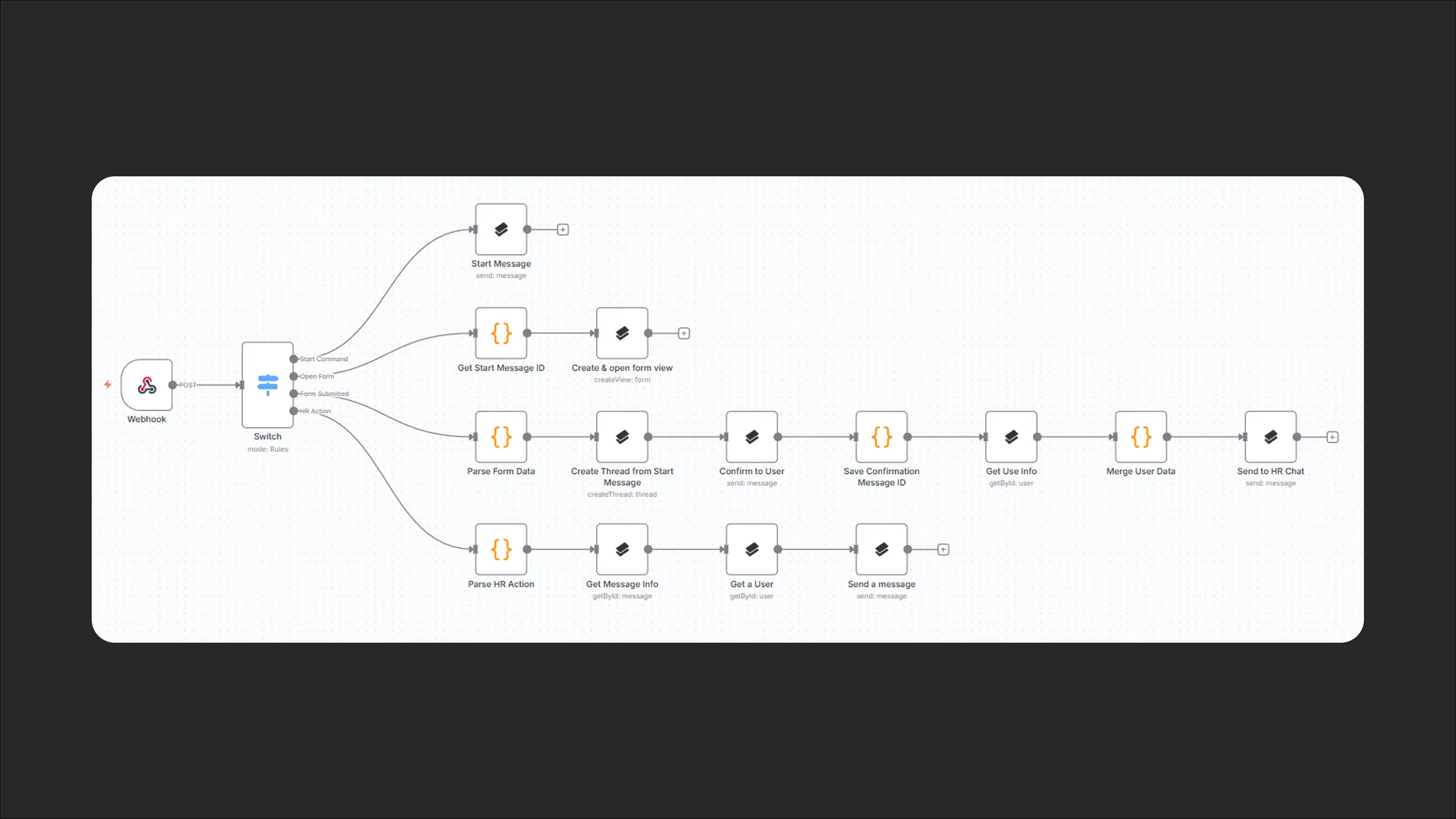
If you need to, you can change other details or rework the bot's logic entirely. If you're not a developer, don't worry: AI assistants handle this really well. You just need to point them in the right direction.
💡 More on forms in Pachca: What forms are and how to create them
Why n8n?
- No coding required: a visual editor with ready-made nodes
- An intuitive chain of actions: you can see the whole process on one screen
- Plenty of easy learning materials, in both English and Russian