
BYOK: Bring Your Own Key in Pachca
How encryption with your own key (BYOK) works in the Pachca team chat app
Pachca combines the convenience of a SaaS platform with full control over your encryption keys. Your company's messages stay confidential, and you can meet strict security requirements.
Overview
Pachca supports the Bring Your Own Key (BYOK) model. Your organization creates and manages its own encryption keys, and Pachca performs cryptographic operations without access to your master keys. This article covers the problems BYOK solves, the envelope encryption architecture, use cases, supported KMS providers and how different types of data are encrypted.
Why BYOK
What it provides
How BYOK helps
Encryption keys stay in the part of the infrastructure your organization controls.
An admin can revoke or rotate a key at any time and immediately block decryption of the data.
You can keep keys in a local data center, even if the data itself is hosted elsewhere.
Demonstrates "Privacy by Design," auditing of key operations and minimal reliance on trust in the provider.
How it works: envelope encryption architecture
Advanced encryption is based on envelope encryption. To encrypt data, Pachca calls your Key Management Service (KMS) to generate a Data Encryption Key (DEK) for a piece of data, along with its encrypted version. Only the encrypted version is stored in the database. When Pachca needs to access encrypted data, it asks the KMS to decrypt the data key using the master key.
Operation flow
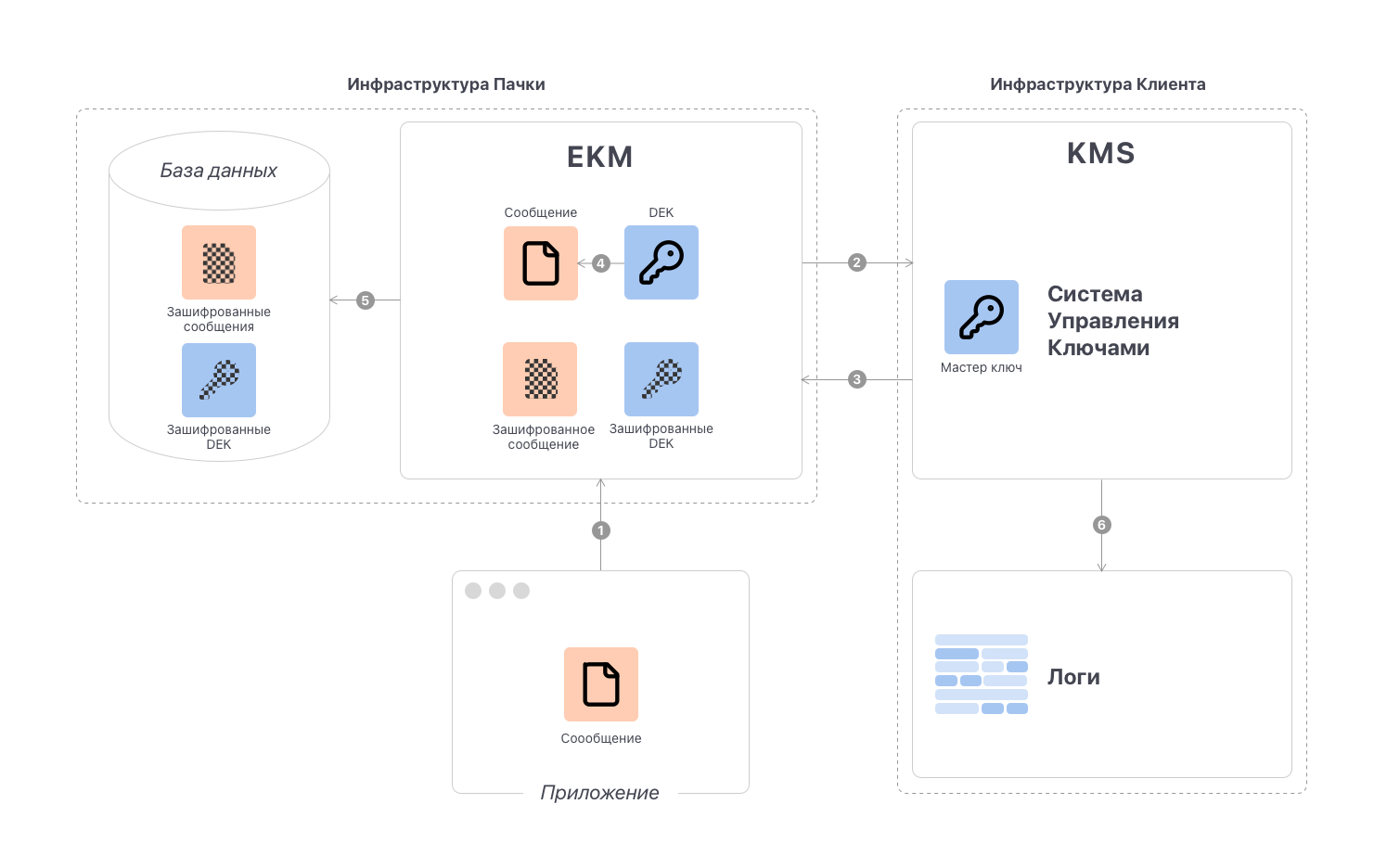
-
Sending a message. The client app sends unencrypted content over SSL to the EKM service inside Pachca's infrastructure.
-
Generating the DEK. EKM calls your Key Management Service and requests a DEK and an EDEK based on the provided encryptionContext (chat, organization, time). This connection can run over a VPN tunnel.
-
Returning the DEK and the encrypted DEK. The KMS returns the DEK and the EDEK. The event is recorded in the KMS logs, which you can access.
-
Encrypting the message. EKM immediately encrypts the content with the DEK. The plaintext is no longer stored.
-
Saving to the database. EKM deletes the plaintext DEK from memory and saves the encrypted message and the EDEK to the database.
-
Audit. A record of each wrap/decrypt operation is automatically sent to your logging system, providing full traceability.
Important: The master key never leaves your KMS. Decrypted encryption keys are kept in RAM only and are never written to disk.
Key hierarchy
Level
Purpose
Typical lifetime
Stored in the KMS and carries the access policy. Used to derive the KEK.
Derived from the Master Key + Encryption Context. Defines access boundaries (chat, time, organization)
Encrypts a specific message or file
Use cases
-
Full access transparency. KMS and app logs record every decryption operation. This speeds up incident investigations and builds customer trust.
-
Flexible access control ("Kill Switch"). An admin can instantly disable the KEK and make all or part of the message history unavailable. This is a key part of a Zero Trust strategy and an incident response plan.
-
Separation of duties (SoD). The security team manages the keys, the SaaS provider is responsible for the infrastructure and internal IT handles user administration.
-
Contractual obligations and audits. Keys stay with your company, so you can clearly demonstrate compliance with NDAs, customer requirements and the terms of regulatory audits.
Advanced encryption vs. standard encryption
Advanced encryption adds to the standard encryption available to all Pachca users.
Data state
Advanced encryption
Standard encryption
Data is encrypted with customer-managed keys as early as possible: at the HTTP proxy or an equivalent entry point.
All interactions with the Pachca interface and API are encrypted over public networks using standard HTTPS and TLS 1.2+. This keeps traffic between you and Pachca secure in transit.
Data in the database stays encrypted. If a third party tries to access the live database, the data is returned as ciphertext.
Service data is encrypted at rest in Pachca using AES-256 keys.
Data stays encrypted even while in use and is decrypted only when there is a specific business case. Every decryption operation is logged and can be reviewed in an external SIEM system.
Data is retrieved from storage and processed as plaintext.
Supported KMS providers (as of today)
-
HashiCorp Vault. Unlike Yandex KMS, HashiCorp Vault also lets you restrict permissions through the encryption context. You can:
- Limit a key to a specific chat or a list of chats.
- Set a time window: for example, allow decryption only until a certain date or on a specific day.
- Combine conditions (chat + date/period) in policies.
How different data is encrypted
Messages: A DEK is generated for each message or, when a conversation is active, for a group of messages.
Search index: The index is also encrypted through the KMS with a single KEK, so global search keeps working.
Files: Encrypted with the key of the message they belong to. Encryption runs asynchronously right after the file is uploaded to storage.
Setup guides
Detailed guides for setting up BYOK with different KMS providers: