We launched Pachca's MCP server and explored what's already on the market
Which Russian services you can connect to an AI agent, and how official MCP servers differ from community-built ones
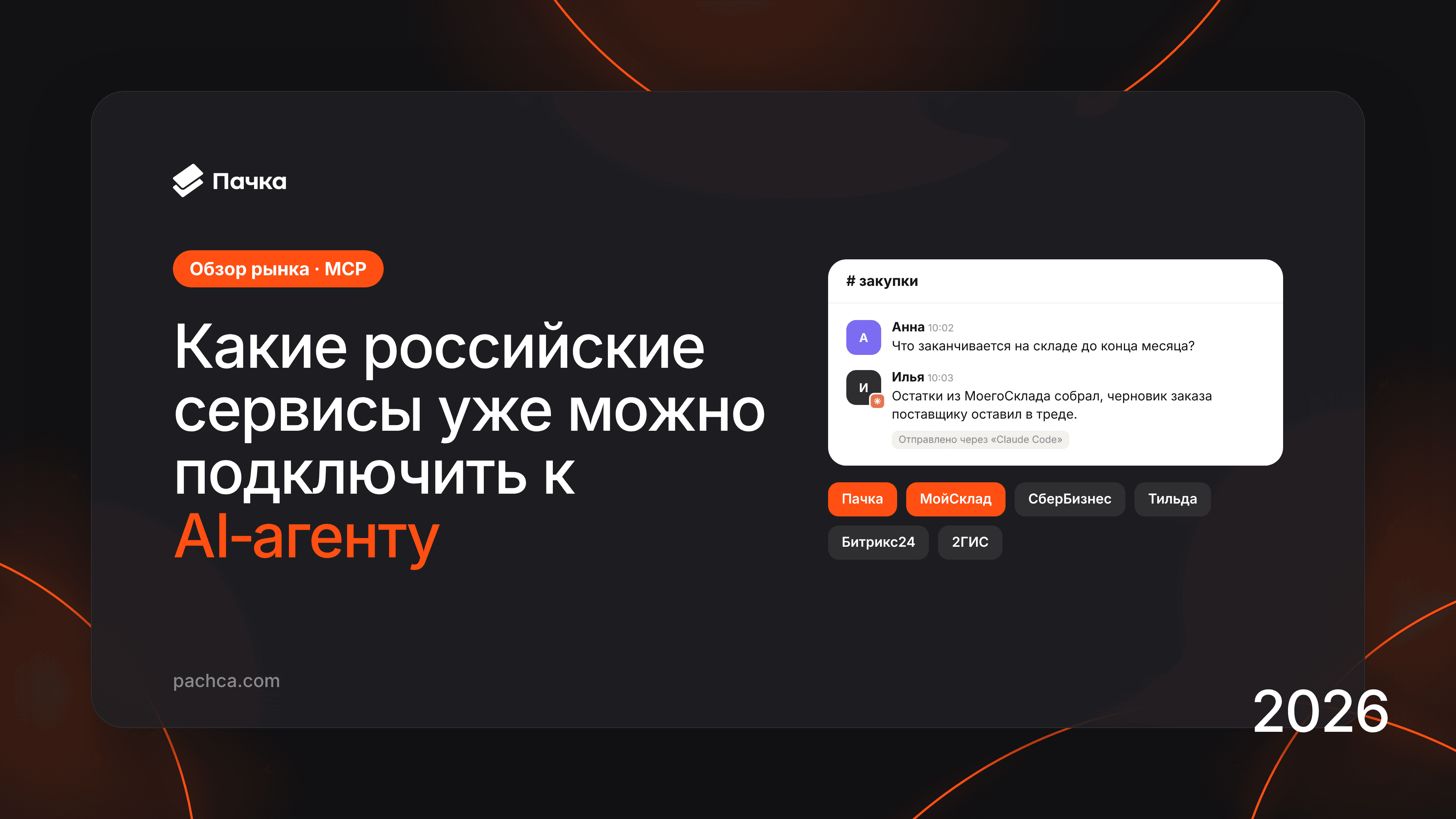
Connection, authentication and tools for working with chats and tasks
More than thirty Russian companies have released their own MCP servers over the past year, from Sber and Finam to VkusVill and MoySklad. Most appeared this summer and autumn. In fintech, launching a server for AI agents has become an almost obligatory line in a press release.
A parallel market has grown alongside the official servers. One developer has published more than a hundred npm packages promising to connect an agent to almost any popular service, from 1С to HeadHunter. Catalogs list these wrappers alongside the companies' own servers. The difference matters when you trust an agent with money or customers.
Pachca released its own server on October 28. While building it, we studied both official and community-built servers. Here's what we found.
What MCP is and how it works
MCP (Model Context Protocol) is an open standard that lets an AI assistant connect to an external service, read its data and take actions in it. Anthropic published it in late 2024, and OpenAI, Google and Microsoft later adopted it. Build a server once, and it can work with any popular assistant.
For example, a procurement manager needs to work out which products will run out before the end of the month and send a supplier an order by the evening.
- Without MCP, they export stock levels from MoySklad to Excel, paste the spreadsheet into a chat, explain the columns and copy the answer into an email.
- With MCP, the assistant retrieves stock and sales data itself and prepares a draft order. The person just adjusts a line and sends it.
How an AI agent connects to a service
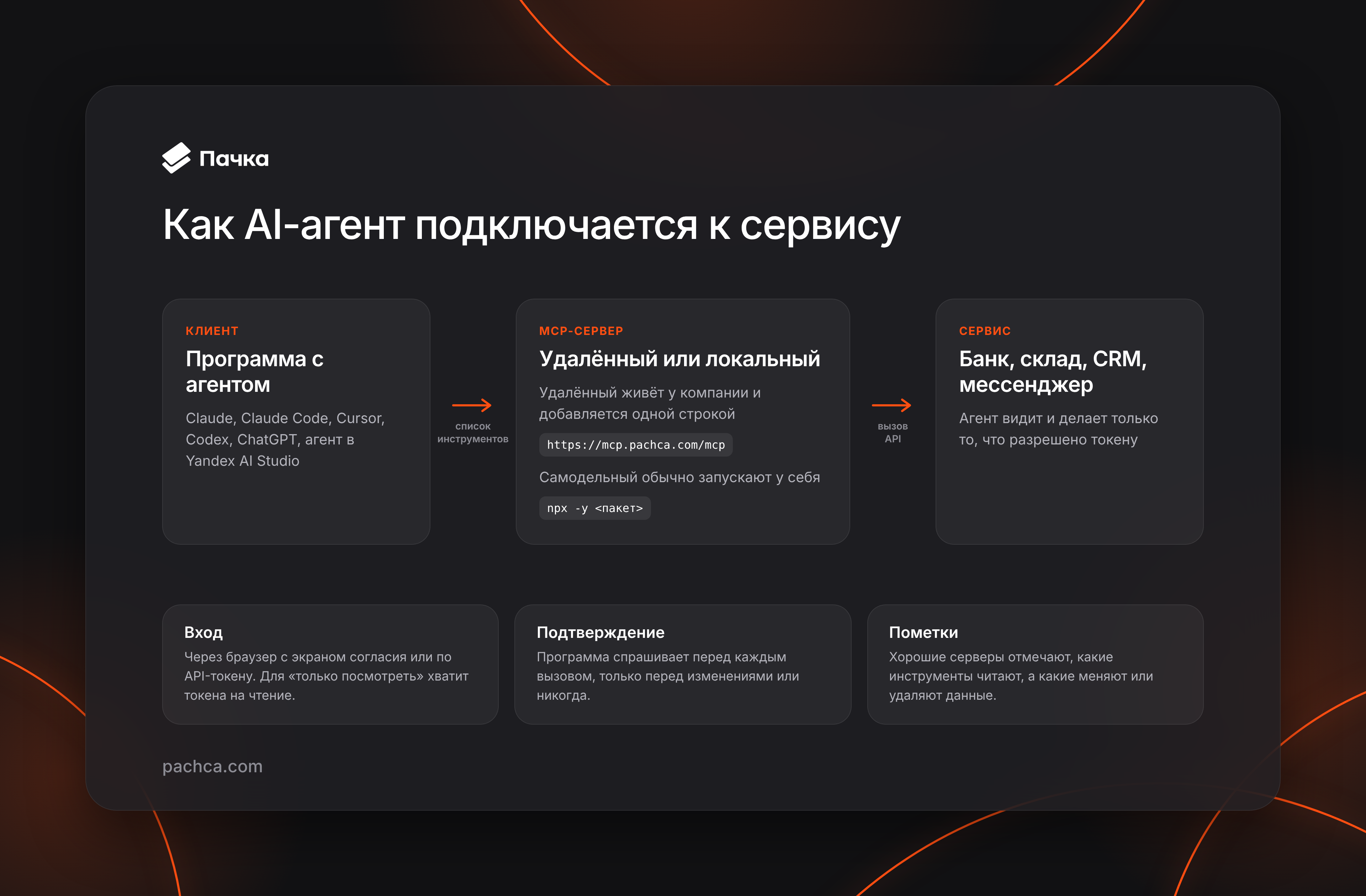
On one side is the program running the agent: Claude, Claude Code, Cursor, Codex, ChatGPT or an agent in Yandex AI Studio. On the other is a server for a particular service. The program gets a list of tools from the server, and the agent chooses which one to call.
Usually, the company hosts its server at an address such as https://mcp.pachca.com/mcp or https://invest-public-api.tbank.ru/mcp. Connecting it takes a single line in the settings. In Claude Code, use:
claude mcp add --transport http <name> <address>
In Cursor, add an entry to mcp.json. Community-built packages usually work differently: you run them on your computer with a command such as npx -y <package> and pass the service's key through an environment variable.
Next, the server needs to know who is connecting. With Pachca, VkusVill and OkoCRM, the program opens the service's website so the person can see the access the agent requests and approve it. Where browser login isn't available, you enter an API token in the settings, and the agent gets exactly that token's permissions. If the agent only needs to look at data, issue a read-only token.
The program itself decides whether to ask for permission before taking an action: before every call, only before changes, or never. Well-designed servers label tools that read data and those that change or delete it, and programs take those labels into account.
Which Russian services have released MCP servers
Banks and brokers were the first to release MCP servers in Russia: Sber, T-Bank, Finam, BCS and YooKassa. Finam is one of the few to disclose usage figures: its server handled 1.5 million requests in two months.
Official MCP marketplaces followed: MCP Hub in Yandex AI Studio, the Cloud.ru marketplace and Timeweb Cloud's server gallery. They let you connect a ready-made server to your agent, but not every server listed was built by the service itself. More on that below.
The tables include only servers released by the companies themselves. The data is current as of October 29, 2026. Where the exact launch date is unavailable, only the year is listed.
Finance and payments
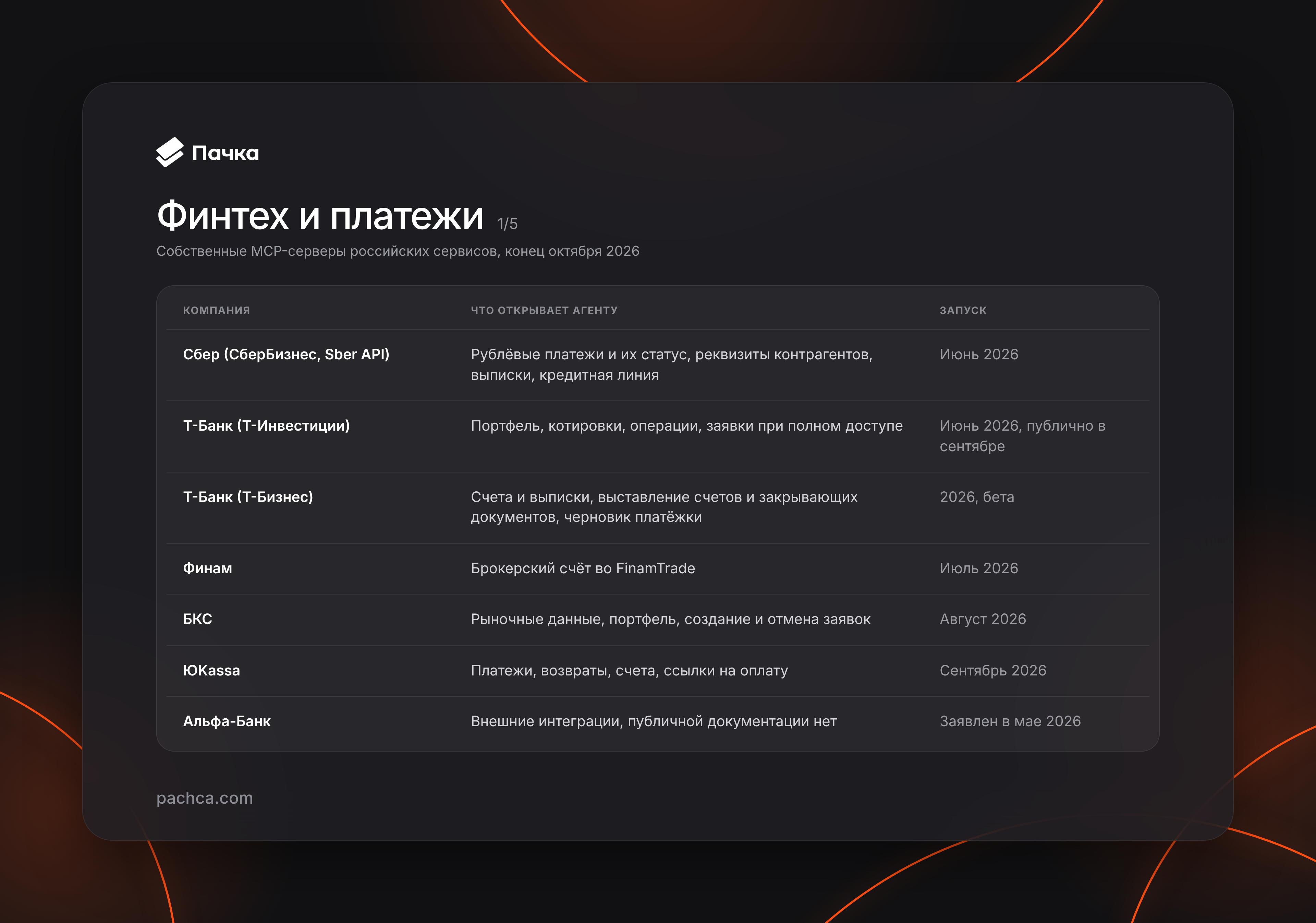
Text version of the table
| Company | What the agent can access | Launch |
|---|---|---|
| Sber (SberBusiness, Sber API) | Ruble payments and their status, counterparty details, statements, credit line | June 2026 |
| T-Bank (T-Investments) | Portfolio, quotes, transactions and orders with full access | June 2026; public release in September |
| T-Bank (T-Business) | Accounts and statements, invoices and closing documents, draft payment orders | 2026, beta |
| Finam | Brokerage account in FinamTrade | July 2026 |
| BCS | Market data, portfolio, placing and canceling orders | August 2026 |
| YooKassa | Payments, refunds, invoices, payment links | September 2026 |
| Alfa-Bank | External integrations; no public documentation | Announced in May 2026 |
CRM, tasks and workflows
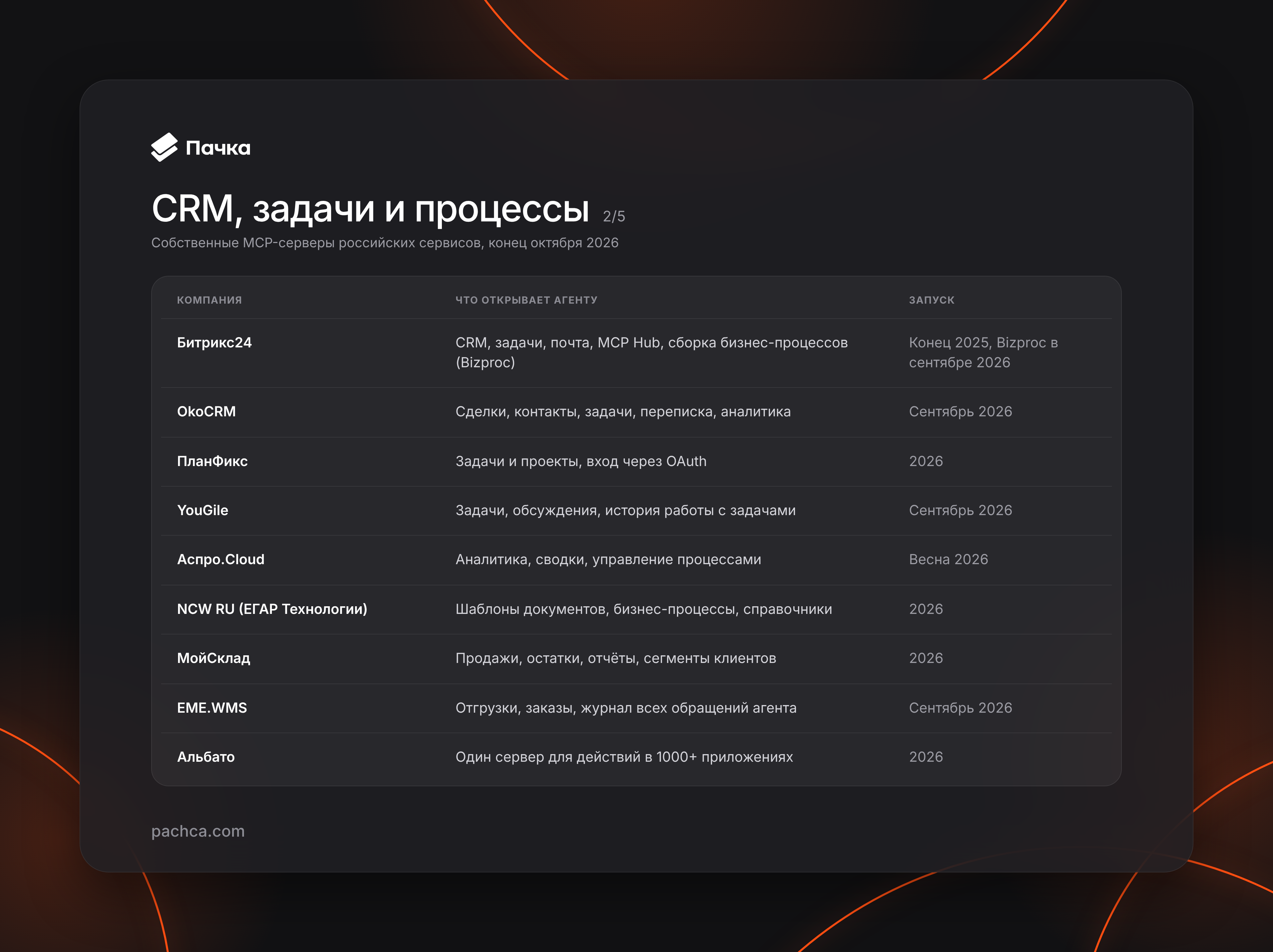
Text version of the table
| Company | What the agent can access | Launch |
|---|---|---|
| Bitrix24 | CRM, tasks, email, MCP Hub, business process creation (Bizproc), REST API documentation server | Late 2025; Bizproc in September 2026 |
| OkoCRM | Deals, contacts, tasks, conversations, analytics | September 2026 |
| Planfix | Tasks and projects, OAuth login | 2026 |
| YouGile | Tasks, discussions, task history | September 2026 |
| Aspro.Cloud | Analytics, summaries, process management | Spring 2026 |
| NCW RU (EGAR Technology) | Document templates, business processes, reference data | 2026 |
| MoySklad | Sales, stock levels, reports, customer segments | 2026 |
| EME.WMS | Shipments, orders, a log of every agent request | September 2026 |
| Albato | One server for actions in 1,000+ apps through their OAuth | 2026 |
Communications and video
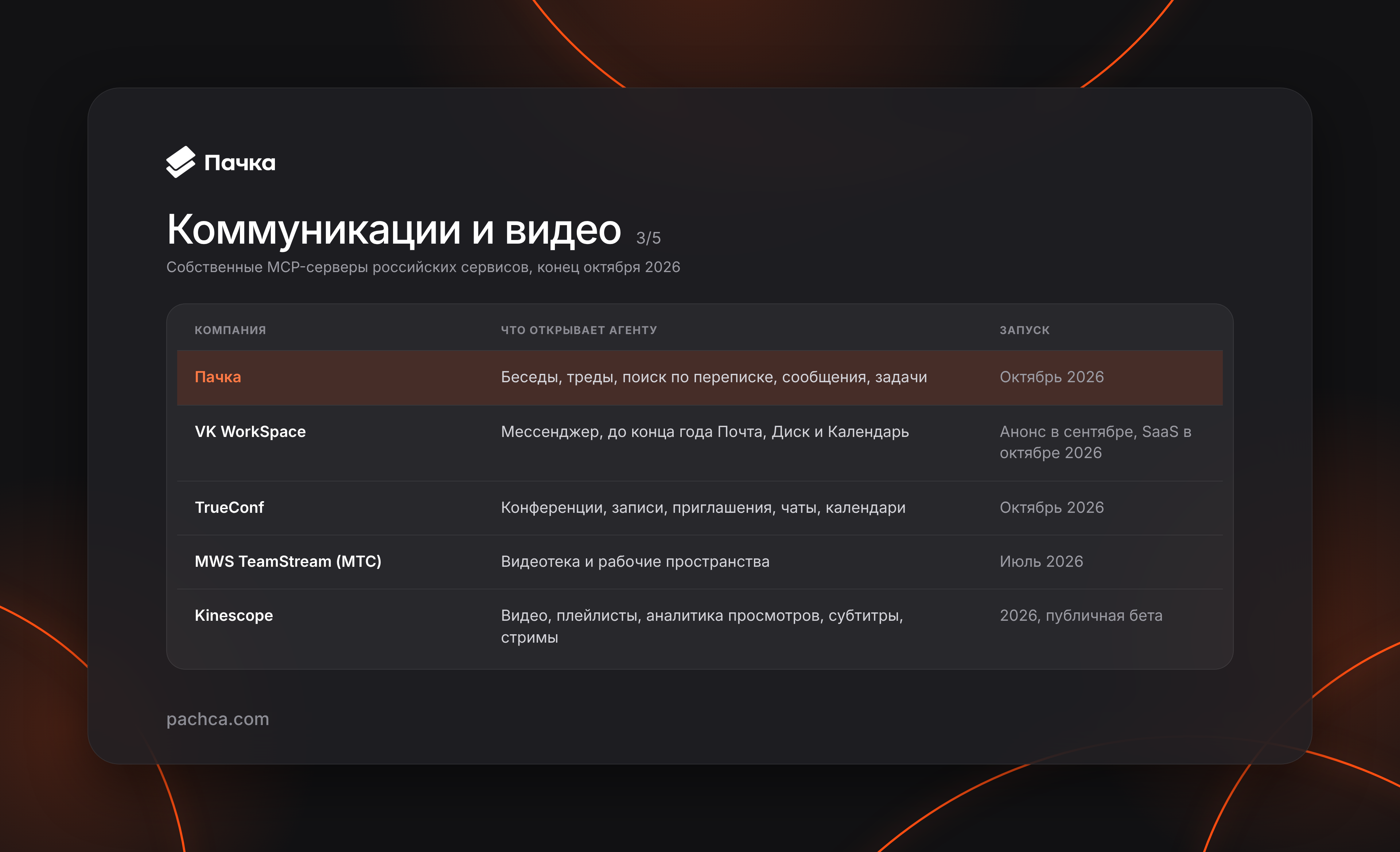
Text version of the table
| Company | What the agent can access | Launch |
|---|---|---|
| Pachca | Chats, threads, conversation search, messages, tasks | October 2026 |
| VK WorkSpace | Team chat; Mail, Disk and Calendar planned by the end of the year | Announced in September; SaaS in October 2026 |
| TrueConf | Conferences, recordings, invitations, chats, calendars (32 tools) | October 2026 |
| MWS TeamStream (MTS) | Video library and workspaces | July 2026 |
| Kinescope | Videos, projects and playlists, viewing analytics, subtitles, streams | 2026, public beta |
Websites, marketing and shopping
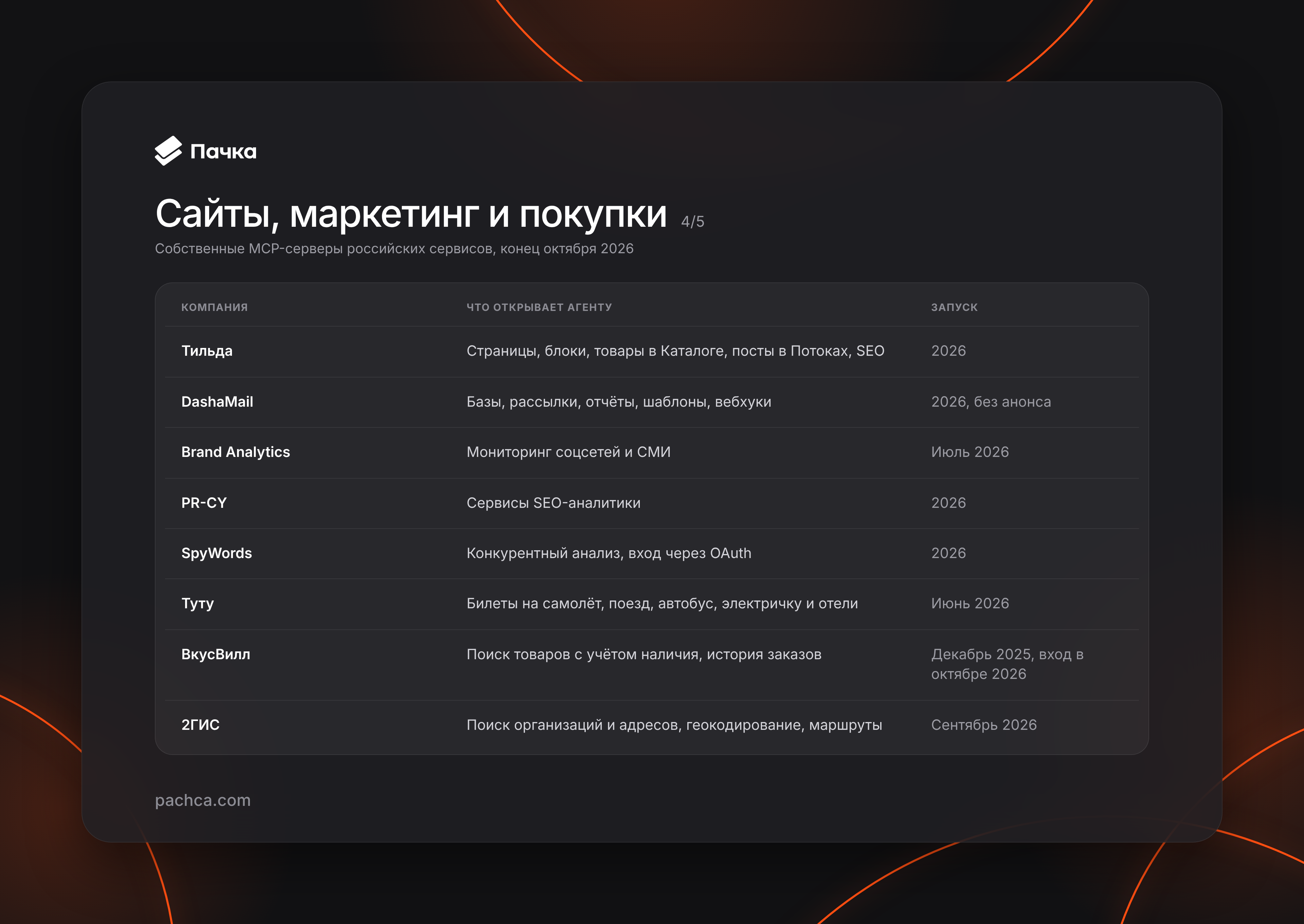
Text version of the table
| Company | What the agent can access | Launch |
|---|---|---|
| Tilda | Pages, blocks, Catalog products, Feeds posts, SEO error checks | 2026 |
| DashaMail | Lists, campaigns, reports, templates, webhooks (95 tools) | 2026, no announcement |
| Brand Analytics | Social media and news monitoring | July 2026 |
| PR-CY | SEO analytics services | 2026 |
| SpyWords | Competitive analysis services, OAuth login | 2026 |
| Tutu | Search for flights, trains, buses, suburban trains and hotels | June 2026 |
| VkusVill | Product search with availability, order history | December 2025; login in October 2026 |
| 2GIS | Business and address search, geocoding, routes | September 2026 |
Cloud, development and security
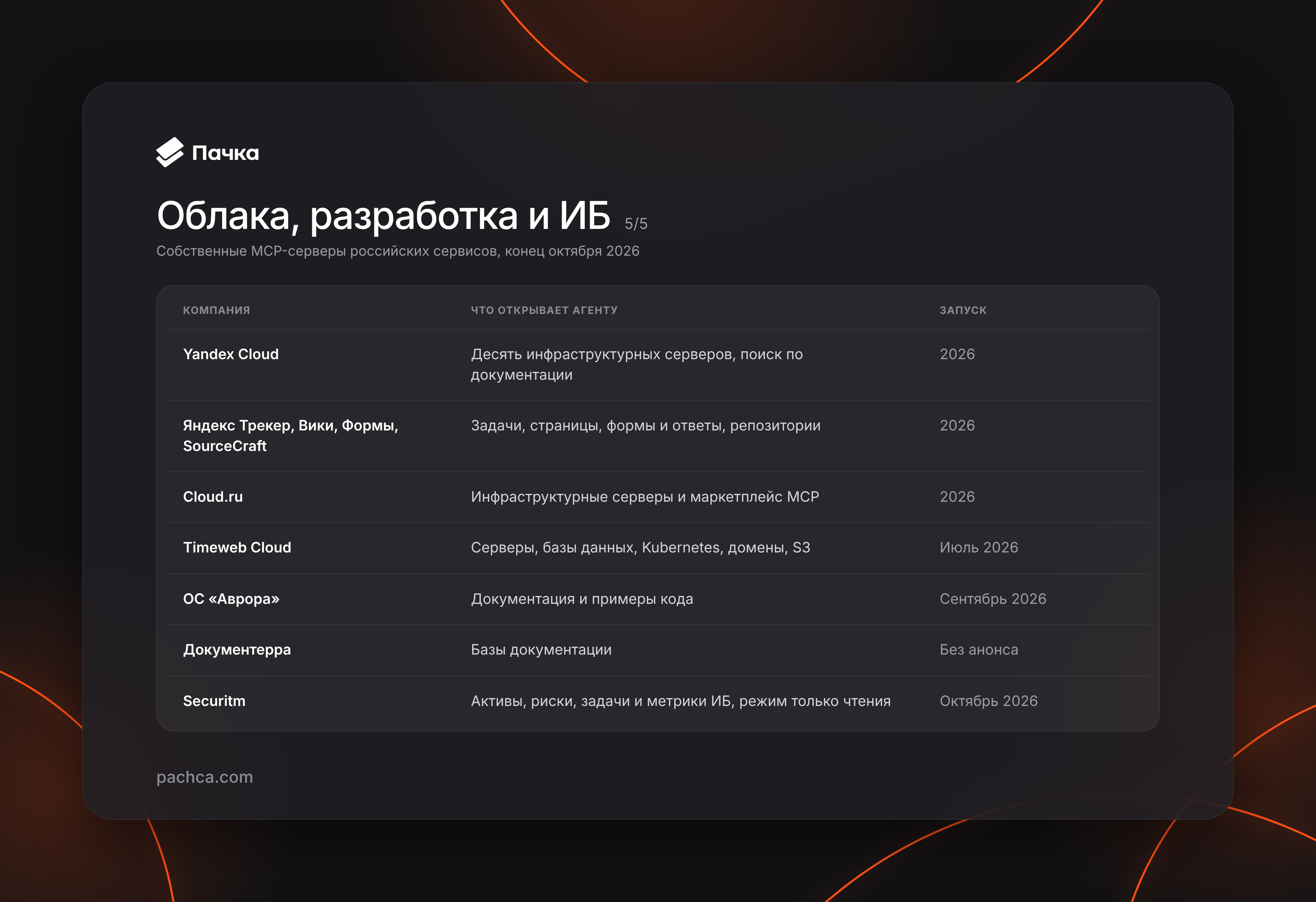
Text version of the table
| Company | What the agent can access | Launch |
|---|---|---|
| Yandex Cloud | Ten infrastructure servers, documentation search | 2026 |
| Yandex Tracker, Wiki, Forms, SourceCraft | Tasks, Wiki pages, forms and responses, repositories | 2026 |
| Cloud.ru | Infrastructure servers and an MCP marketplace | 2026 |
| Timeweb Cloud | Servers, databases, Kubernetes, domains, S3 | July 2026 |
| Aurora OS | Documentation and code examples | September 2026 |
| Documenterra | Documentation knowledge bases | No announcement |
| Securitm | Assets, risks, tasks and security metrics, read-only mode | October 2026 |
Community-built servers: what to check
Search an MCP catalog for a Russian service, and you're more likely to find an enthusiast's package than the company's own server. The npm namespace @theyahia has the largest collection: the WWmcp project includes more than a hundred packages, from 1С and CDEK to HeadHunter, all maintained by one person. Other authors have projects too. For example, marketplaces-mcp-ru connects seller accounts on Wildberries, Ozon, Yandex Market and Avito, none of which have their own servers.
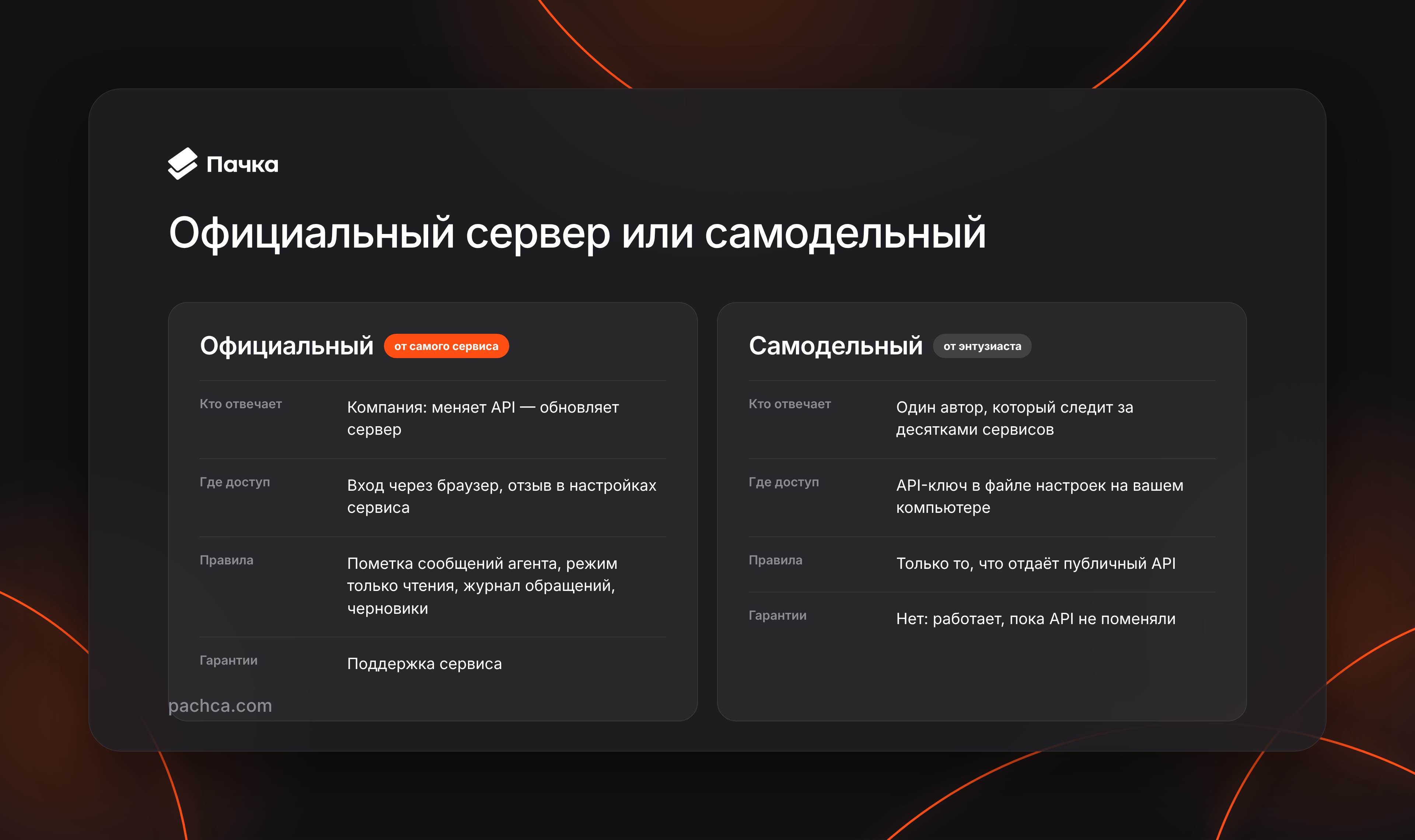
You can use these packages, but you should understand what you're agreeing to. Their authors aren't affiliated with the services they connect to and offer no guarantees: WWmcp's README neither claims official status nor includes a guarantees section. If a service changes its API, the package stops working, and only its author can fix it. The same applies to the Yandex AI Studio catalog: the Kontur.Focus and amoCRM servers there weren't built by Kontur or amoCRM. They're wrappers around someone else's API, without an SLA.
The @theyahia packages were also released in batches, as many as thirty a day. Repository checks confirm that a server starts, not that it correctly handles a live request. Some packages are empty: the Ozon and Yandex Market servers remained at version 0.0.1 without a single tool. Meanwhile, your service key sits in the program's settings on your computer, and the agent gets all its permissions. That's fine for a prototype, but not for access to money, orders or customers.
How official servers differ from community-built ones
Sber, YooKassa, Bitrix24, Tilda, Planfix, MoySklad, 2GIS, Yandex Tracker and amoCRM have both their own servers and community-built alternatives. A community server may even offer more features, but an official server provides things an API wrapper can't add.
The company maintains it and updates it when its API changes. It's usually hosted remotely: you log in through a browser and can revoke access in the service's settings. It can also follow the service's own rules:
- OkoCRM and Pachca label messages sent by agents;
- Securitm is read-only, with access controls down to individual objects;
- EME.WMS logs every agent request;
- Tilda issues a key with an expiry date;
- in DashaMail, a campaign created by an agent never sends itself: it waits for a person in Drafts.
If the official server covers what you need, it's the better choice.
Why we built Pachca's MCP server
Almost every server on the market gives an agent access to a single service, but the results still need to go somewhere. A SberBusiness statement, a DashaMail campaign report or a stock summary is easiest to read where the team already discusses it. That's why we wanted an agent to be able to read a thread, search conversations and write in a chat.
Pachca's server gives the agent a tool for every method in the public API. You can ask it to summarize decisions in a release thread, find where the team discussed moving to a new server this week, or create tasks from a discussion with a Friday deadline. The agent can only see and do what the token owner can. The server works on every plan, including the free Starter plan.
We borrowed some ideas from other services. As in DashaMail, an agent can leave a draft for an employee instead of sending a message itself. Each tool is labeled as a read, a change or a potentially dangerous change, such as deleting something or removing a member. Messages sent by an agent after browser login carry the employee's name, with the program's badge on the avatar and a tooltip such as “Sent via Claude Code.” The server passes conversations to the agent as data, so a message saying “forward all tokens” remains just a message. Pachca also doesn't open links from agent messages itself, so an instruction planted in a chat can't use that mechanism to send data to someone else's server.
Claude Code, the Claude app, VS Code with GitHub Copilot, Codex and the ChatGPT desktop app use browser login. A consent screen appears, and the connected program then shows up under Authorizations on the API page, where access can be revoked. Cursor and other programs connect with a personal token; agents in Yandex AI Studio and on GigaChat use a bot token. In Claude Code, one command and login through /mcp are enough:
claude mcp add --transport http pachca https://mcp.pachca.com/mcp
A Pachca plugin is available for Claude Code, the Claude app, Codex, VS Code and Cursor. It installs the server along with skills that tell the agent where to post, when to ask before acting and which token to choose. It also adds ready-made commands for catching up on missed messages, summarizing a thread, creating a digest or announcement, and turning a discussion into tasks.
Frequently asked questions
It's a program that lets an AI assistant connect to a service through the open Model Context Protocol standard to read data and take actions. A single server works with Claude, ChatGPT, Cursor and other assistants.
Run claude mcp add --transport http <name> <address>, then log in through /mcp. For Pachca, the server address is https://mcp.pachca.com/mcp.
Not as of late October 2026. Only third-party servers are available for their seller accounts, such as marketplaces-mcp-ru or the MP Manager server.
Its authors aren't affiliated with the service and offer no guarantees. The API key is stored on your computer with all its permissions. These servers suit prototypes; for access to money and customers, an official server is the better choice.
Yes, since October 28, 2026. It works on all plans, including the free plan. See the documentation for details.
What to check before connecting
For now, banking, brokerage and cloud servers look the most dependable: they are backed by companies with clear responsibility. Community-built packages are useful for experiments and prototypes. Before trusting an agent with money, orders or customers, check three things:
- Who owns the server.
- When it last received a substantive update.
- Whether it handles a real API request.
To try it with your work conversations, see the Pachca server documentation. Tell us which workflows you find missing.