Team chat apps: what they are, why businesses need one and how to choose
How a team chat app differs from Telegram and WhatsApp, what jobs it does and which criteria to compare options by. A practical guide from the Pachca team
A company's work conversations often live in Telegram: a dozen groups with the same names, an important decision buried between memes, a former employee who still has access to every chat, and nobody can find what was agreed two weeks ago. You can work like this. You can't manage it.
A team chat app solves exactly this problem. In this guide, we'll cover what the tool is, how it differs from the messaging apps you're used to, what jobs it does and how to pick the right one, using criteria you can check before you buy, not after.
What is a team chat app
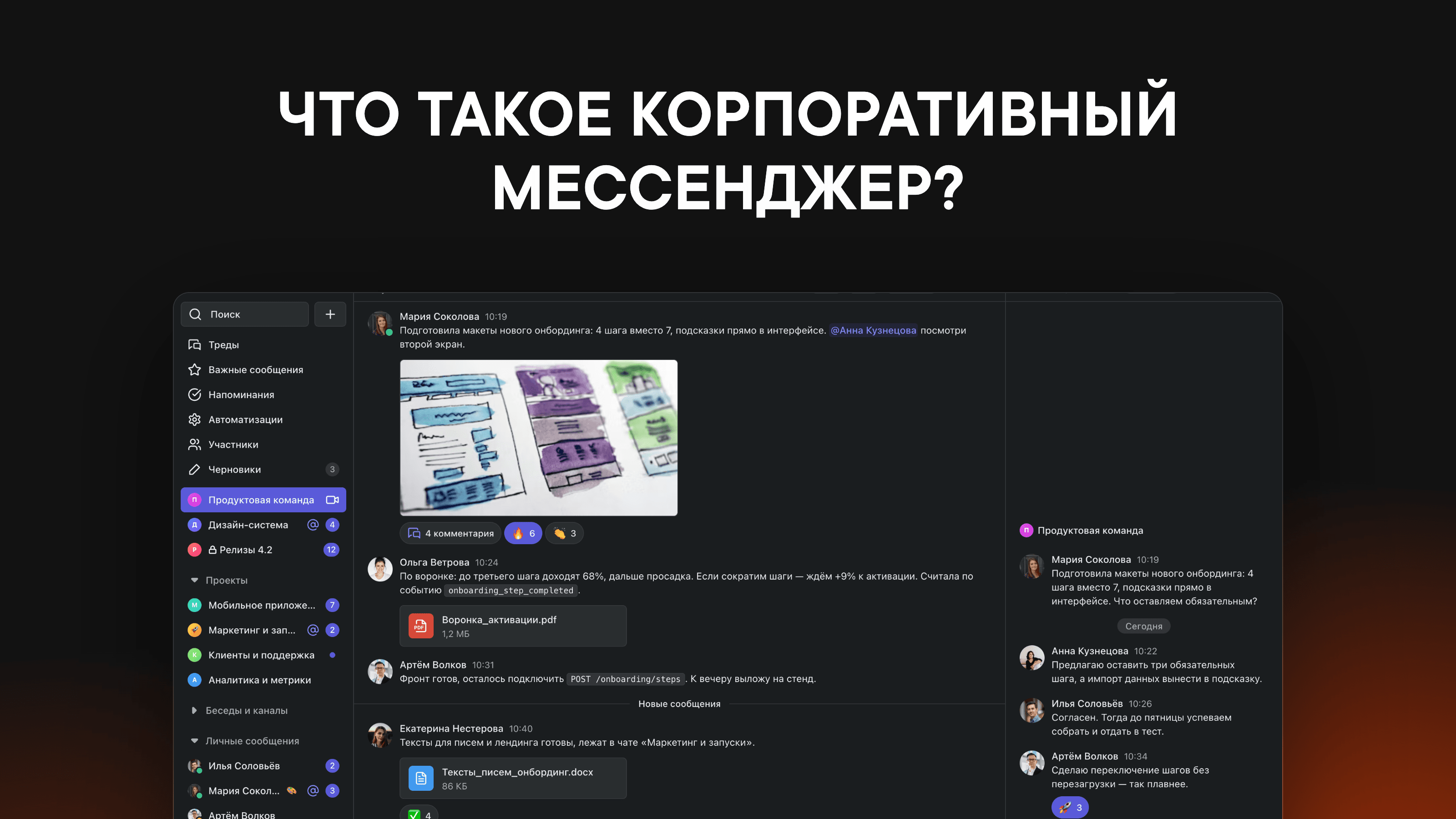
A team chat app is a separate environment for a company's work communication: chats, threads, calls and integrations with work tools, all managed by the company itself. The key word is "managed": an admin grants and revokes access, and conversations belong to the organization, not to employees' personal accounts.
It goes by many names: corporate chat, internal messaging app, business chat app, employee chat. The idea is the same: a shared, secure space where the whole team works, from a department's group chat to a company-wide call.
How it differs from Telegram and WhatsApp
Telegram and WhatsApp are good personal messaging apps. The problems start when a whole company builds its work communication on them.
Access. In a personal messaging app, chats are tied to people. When an employee leaves, the conversations, files and client contacts stay on their phone. In a team chat app, an admin deactivates the account, and access is cut off instantly, everywhere.
Structure. In a personal messaging app, all communication is a flat list of groups. A team chat app has threads: side discussions attached to a specific message. One channel, ten parallel discussions, and none of them gets in the way of the others. Pachca has cross-chat threads: you can bring any colleague into a thread with an @mention, even if they aren't in the original chat. They'll see the context and jump in without anyone having to recap.
Keeping track of people. A new hire in a personal messaging app means "add Ivan to 14 chats, does anyone remember which ones?" In a team chat app, there are group tags: add someone to their department's tag, and they're automatically added to all the right chats.
Data responsibility. In personal messaging apps, a company's conversations are stored on servers the company has no say over and no contract with. When you handle personal data and trade secrets, that's a risk customers and regulators are less and less willing to accept.
We've put together a point-by-point comparison on the Pachca vs. Telegram page.
Why a company needs a separate team chat app
The short answer: so that everything work-related (chats, calls, announcements, notifications from your tools) lives in one place that the company controls. In practice, a team chat app handles several jobs at once.
Team communication. Chats for departments and projects, threads for discussions, direct messages and statuses. Everything work-related in one place, with search across the full history.
Calls and meetings. Video calls with screen sharing right from the chat, without a second service or passing links around.
Internal communications. Announcement channels, polls and onboarding for new hires: someone starts a new job and on day one sees where everything is and who to ask about what.
Automation. Notifications from CRMs and task trackers, bots, webhooks and an API. The discussion of a bug and the notification that it's fixed happen in the same thread.
Control and security. Roles and permissions, an audit log, device management and DLP, a built-in data leak prevention system. Admins see what's happening with company data and can act on it.
How to choose a team chat app: eight criteria
At Pachca, we regularly talk with teams moving over from personal messaging apps and foreign platforms. The conversation about choosing almost always comes down to eight questions.
1. Where the data is stored. In Russia or abroad, with the vendor or with you. If your company handles personal data, the answer determines compliance with Federal Law No. 152-FZ (Russia's personal data law). Ask the vendor directly: how clear the answer is counts as a criterion in itself.
2. Deployment model. The cloud is faster to launch and doesn't need your own infrastructure. On-premise gives you full control but requires servers and people to maintain them. There's also a middle ground, hybrid on-premise (BYOK): data is stored in the cloud but encrypted with the customer's keys. The honest answer to "do we need on-premise?" is more often "no, but it would be nice." Calculate the total cost of ownership, not just the licenses.
3. Russian Software Registry. It's a must for the public sector and state-owned companies, and for everyone else it's insurance against a repeat of foreign services pulling out. Pachca is in the registry and certified for Astra Linux.
4. Communication structure. Whether there are threads and how they work, and whether there are channels, tags and folders. This is what separates a tool where you can find a decision a year later from an endless feed of messages.
5. Integrations and API. Check against your own list: task tracker, CRM, calendar, monitoring. If there's no ready-made integration, how open is the API, and are there webhooks so you can build it yourself?
6. Calls. Call quality, participant limits, screen sharing, recordings. It's better to hold one department call in a test workspace than to trust a features page.
7. Migration. Can the app import your history from what you use now: Telegram, Slack, Mattermost? Starting from scratch means losing every agreement that lived in your old chats.
8. Price and billing model. Calculate for a full year and for your real headcount, including people who "just read." Find out what's included in the free plan and where its limits are: most solutions, Pachca included, let you start for free, but the limits vary.
For a detailed comparison of specific products against these criteria, see our 2026 ranking of team chat apps.
Common mistakes when choosing
Choosing by feature list. In comparison tables, everyone "has" everything. The differences show up in real use: take three of your typical workdays and run through them end to end in a test workspace.
Testing with two people. A team chat app for a company should be tested with a department, not a couple of enthusiasts. Problems with chat structure and notifications show up with twenty people, not two.
Forgetting about the move. The decision is made, and how to move three years of conversations over is the last question anyone asks. Check the import during the pilot.
Underestimating habit. Your team will compare any new tool to Telegram, and for the first week not in its favor. That's normal. What helps: clear rules for "what we discuss where," your history moved over and a couple of weeks of patience.
How to move without losing your message history
A typical plan looks like this:
- Pick two or three candidates based on the criteria above and set up test workspaces.
- Run a pilot with one department: real tasks, real calls, two weeks.
- Move your history over. Pachca can import chats from Telegram, Slack and Mattermost, along with their structure and files.
- Set up the structure in advance: channels, department tags, integrations. People should arrive in a ready workspace, not an empty one.
- Announce a date after which work questions are handled only in the new app. Without one, the move drags on for months.
Today more than 250,000 employees from over a thousand organizations use Pachca, including Lamoda, Ivi, Alfa-Bank and PSB. Nearly all of them started with the same question you're asking now.
If you want to see how it works for us, create a workspace and try it with your team. It's free and takes a couple of minutes. And if you'd rather read first, check out our team chat app ranking or message our support team, and we'll help you compare options for your needs.