How to build a product based on user feedback
How to collect, analyze and use feedback to build a successful product

How to collect, analyze and use feedback to build a successful product
Hi, I'm Nikita Kritsky, a product manager at Kaiten. In this article, I'll walk you through how to collect, analyze and use user feedback to build a product people are willing to pay for. We'll cover the stages of the process, feedback collection methods and real examples of how we put it into practice at Kaiten.
Why build your product based on feedback
In-house developers don't always know the field and its nuances inside out. They often can't see the product's weak spots or how to improve it, because they're not the target audience and don't use the product themselves.
That's exactly why you need to talk to users regularly: it helps you understand what they really need. Feedback makes it easier to see what your audience needs, how to develop the product and how to make customers willing to pay for it.
Building your product based on feedback helps companies:
- Stay competitive. The product will meet your audience's expectations and needs better than competitors' offerings.
- Reduce risk. Building new tools or products is risky. Feedback lets you fix shortcomings quickly and shows whether you're heading in the right direction.
- Build customer loyalty. Users see that the company values their opinion, which builds trust and strengthens their connection with the product.
- Cut development time and costs. You can avoid mistakes and rework and focus on the features that really matter.
If you want to improve your product and get the most out of it for your business, you need to collect feedback from real users. It may not always move the product forward in terms of features, but it makes it more stable.
Methods for collecting user feedback
It's important to learn how to combine different feedback methods to get a complete and objective picture. Analyze what you learn and use it to make decisions about developing the product and improving the customer experience.
In-depth interviews and CustDev (Customer Development)
CustDev helps you study your target audience and understand what to build into the product. It also shows you how users solve their problems today, so you can learn to fit your product into those workflows.
One part of CustDev is the in-depth interview, where you discuss a user's needs one-on-one and how your product can meet them. It gives you detailed information and helps you understand users' problems and the reasons behind their behavior.
When to use interviews and CustDev:
- early stages of development,
- testing new ideas,
- analyzing complex problems and looking for solutions.
This is also the stage for a UX call: watching a person use the product in real time, studying their experience and adjusting development based on it. This method shows you what the user is doing wrong and how they get things done, and it helps you spot behavior patterns.
For example, when building websites, designers and front-end developers test different button options. During one round of testing, they found an area users simply didn't notice. An in-depth interview lets you find out why users behave that way. In other words, you can track behavior patterns and then use those observations to improve the product.
 It's fine to get sidetracked by feedback, just don't get carried away
Surveys
Another way to get information from users is to run an online or offline survey. You'll quickly and cheaply collect a lot of data, and the answers are easy to analyze.
The problem with this method is that the information you get is superficial. A survey is unlikely to reveal users' deeper motives or the root causes of their problems. People may misread a question or answer it incorrectly.
When to use surveys:
- collecting general statistics;
- measuring user satisfaction;
- measuring NPS (Net Promoter Score).
Customer requests
It's great when users want to leave feedback on their own, for example on your website. You can set this up with a dedicated widget, a Telegram bot or comments on a page. Any requests you get this way fall into 2 categories: reviews and ideas or improvement requests.
A review is a user's opinion about the service and how it works. Thoughtful reviews can give you ideas for improving the product and how the team works.
A change request is a message asking to add or change a feature. These requests are usually reviewed by the product team, the project manager and developers.
For example, there's a Russian alternative to Miro with a bare-minimum feature set. When you try to add more tools, the service suggests writing to the developers. That way the product evolves based on what its target audience needs. The product's website even has public votes on new features.
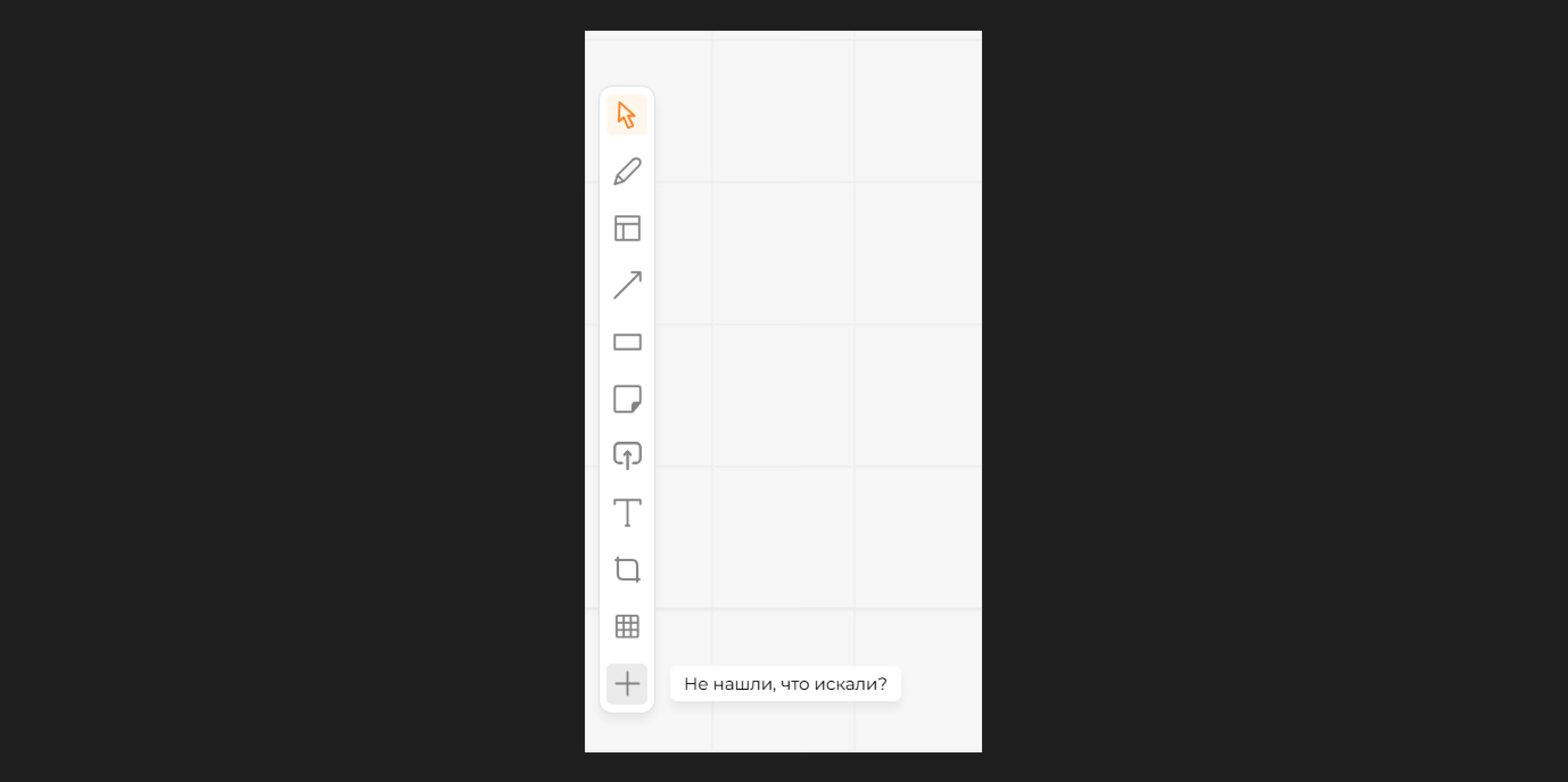
This way, they analyze each user request and decide whether it makes sense. Not everything the audience asks for will get built.
Support
Support isn't just a way to solve customers' problems with the product or answer their questions. It's also a source of feedback.
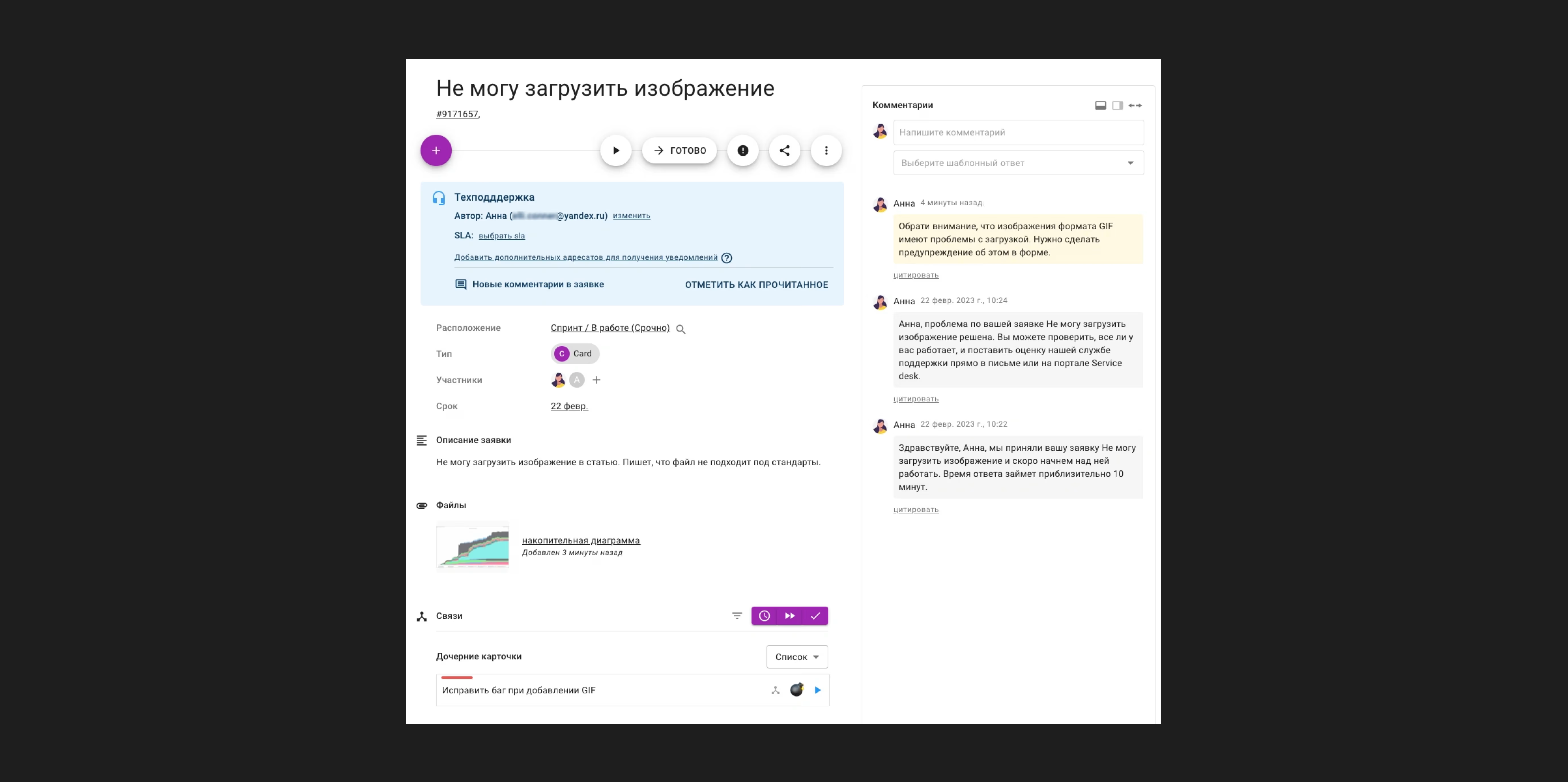 Example of a support ticket
Every request that comes into support needs to be organized. It's a constant stream of information from customers about their experience with the product, the difficulties they face and the problems they need help with. Large companies tag every request to sort it into categories, then analyze them and pick up the relevant ones.
When to use this method:
- solving problems quickly;
- finding product shortcomings;
- improving service quality.
Unlike CustDev, support gets a request once the problem already exists. So it's not a way to prevent bugs or shortcomings, but rather a way to learn which mistakes development has already made.
 A customer submits yet another change request, even though every other customer uses the tool just fine
Keep in mind. Users often write to support when they're frustrated and annoyed. That doesn't mean your product is bad. People just leave positive feedback much less often, and very few contact support to share it.
Sales
Sales managers can regularly collect information about potential customers' objections, questions and needs. That shows us what's holding customers back from buying, what doubts they have and what they're missing to buy or switch to the service.
When to use this method:
- optimizing sales;
- improving the product.
The sales team collects requests from new users and from people who haven't bought the service yet. For example, a bank might send a 200-page document with the requirements it needs to work in the product. The team will check how well the product meets those requirements. If it meets 80% of them, you can build out the remaining 20%. But if most of the requirements can't be met, it's worth adding some of them to the backlog and building them when the need and resources appear.
Keep in mind. This information can be subjective and doesn't always reflect users' real needs.
Account managers
Account managers are always in touch with existing customers. From time to time they run internal surveys, or employees come to them with complaints about specific tools.
The manager collects a list of change requests from customers and sends it to the product team. Every request is prioritized: how feasible it is, how many people the tool affects, how critical it is and whether it needs to be picked up urgently.
When to use this method:
- to improve work with key accounts;
- to develop the product.
Keep in mind. You need to collect information from all users so it isn't limited to the needs of just a few or key customers.
For example, a customer asks you to add a button without explaining what's wrong with the current functionality. That's no reason to start redoing everything for their request. The account manager should first ask the customer directly what exactly bothers them about the current functionality and why the button needs to be added to the site. Only after gathering that information should they pass it on to the product team.
 The team has to keep a balance: new features shouldn't get in the way or make the product harder to use
Working with feedback: what to do once you have it
Users may suggest unexpected solutions and perspectives the team hadn't even considered. Gather all the requests from your different channels, combine them, then prioritize all the feedback and turn it into a list.
There are lots of ways to prioritize tasks. For example, you can use the MoSCoW method, which is easy to adapt to any task or project.
All tasks fall into 4 categories:
- Must Have. What needs to be done first. Without these, nobody will buy the product or it won't work.
- Should Have. Tasks that don't affect whether the product works but may be important. They're done right after the Must Have category is finished.
- Could Have. Nice-to-have but optional tasks. You can do them if resources free up.
- Will not have. These tasks don't affect whether the product works or whether the release succeeds, so you can postpone them or drop them altogether. They're marked as the least important with the lowest return. There's also a reading of this category as Would Like, where tasks can simply be put off for a long time.
 What each category means
Once all the tasks are sorted, you can start working on them category by category.
At Kaiten, we prioritize tasks with a weighting system. We take a set of criteria and assign each one a weight:
- Reach. For example, if the same request comes from 20 customers, that tool gets more weight than a request from 1 customer. What matters here is the number of voting licenses: if there's 1 customer with 10,000 seats, they carry more weight than 1,000 customers with only 5 employees each.
- Modules. These can be priority (weight 1) or non-priority (weight 0). A minor side tool gets a weight of 0, while changes to a key part of the product get 1.
- Contract type. A feature may be interesting to build but not critical to ship right away. If it becomes the deciding factor in a customer's choice of service, its priority goes up. These are contractual obligations that can add 9 out of 10 weight points.
- Competitive threat. We check whether our closest competitors in the Russian market have the requested feature and decide whether that could become a threat. Roughly speaking, if 200 customers ask for document editing and every major competitor has it, we need to build it fast.
After prioritization, ideas go into the backlog: the list of tasks to be done and the tools or features users want.
In Kaiten, you can structure the backlog itself by priority. For example, create a "Backlog" column with all planned work and separate columns for urgent and routine tasks. You can also set priorities for each card individually or set WIP limits so a column never holds more tasks than the team can finish in a sprint.
Once we've picked the most important, "heaviest" tasks, we can put them on the calendar and plan the work. That gives us a roadmap: a work schedule and a visual of the steps toward the goal. A roadmap shows who's doing what at each stage.
 Here's what a project roadmap might look like
To build a roadmap in Kaiten, you can use a Gantt chart. It makes it easier to estimate the people, budget and time you'll need and to plan your path to the goal.
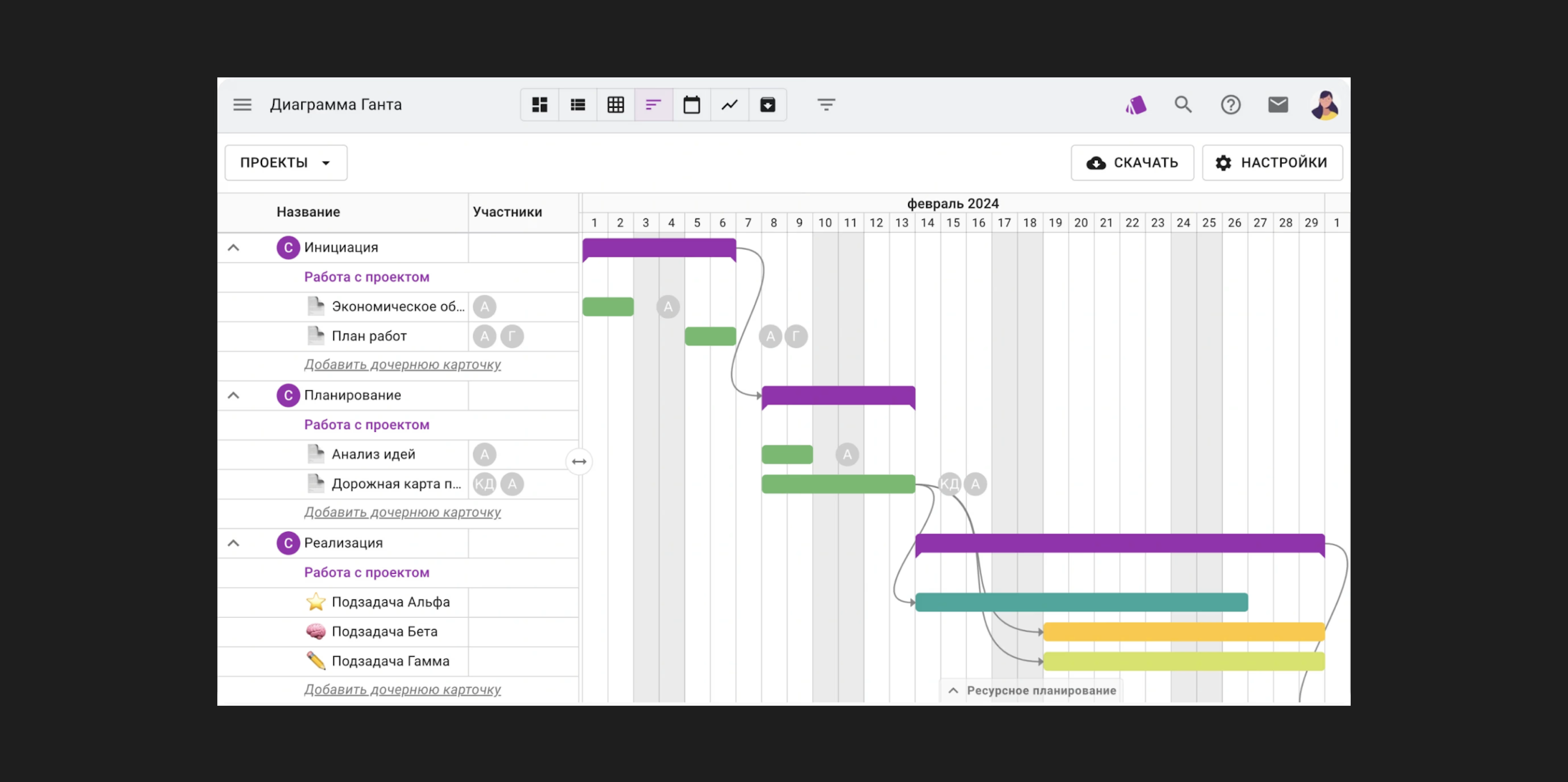 An example Gantt chart in Kaiten
When a task gets picked up, the team follows these steps:
- draw prototypes;
- show them to a focus group;
- run usability testing;
- write up the task for developers;
- ship several releases;
- test what was built;
- open access to users.
Once the tool is live, it's important to go back to users and check whether the problem is now solved. Ideally, you'd track feedback on every release. It helps you see how well you understood the user's request and implemented the feature.
For example, at Kaiten we collected 5 requests from different users and addressed them with one tool. Then we got feedback from customers: for 4 of them the problem was solved, and for 1 nothing changed.
At that point, developers need to decide whether to put the task back in the backlog or try to fix the issue in the next release.
Keep in mind. Working with feedback has to be flexible and dynamic. New input keeps coming in, so priorities can shift whenever a new critical issue arrives.
Letting users know about a new release
There are two main approaches to announcing releases to users:
Infrequent, large releases. Updates ship rarely, every 2 weeks or once a quarter. Release cycles of 1–2 weeks are more common. It's always the result of long work on dozens, sometimes hundreds, of changes.
Before or right after the release, users get a detailed, extensive changelog: a full list of all new features, bug fixes and other changes.
Frequent, small releases. This is the approach at Kaiten and other companies that work in Kanban with a continuous flow of improvements. We're constantly updating, trying and testing things.
Updates happen often, sometimes several times a day. Each release includes a small number of changes.
In this case, users are notified in one of these ways:
- Release notes. Each new feature or fix gets a short description, published 1–2 days before the release or right after it. That's what we do at Kaiten.
- Knowledge base. Information about every change goes into the knowledge base, where users can find details on any update.
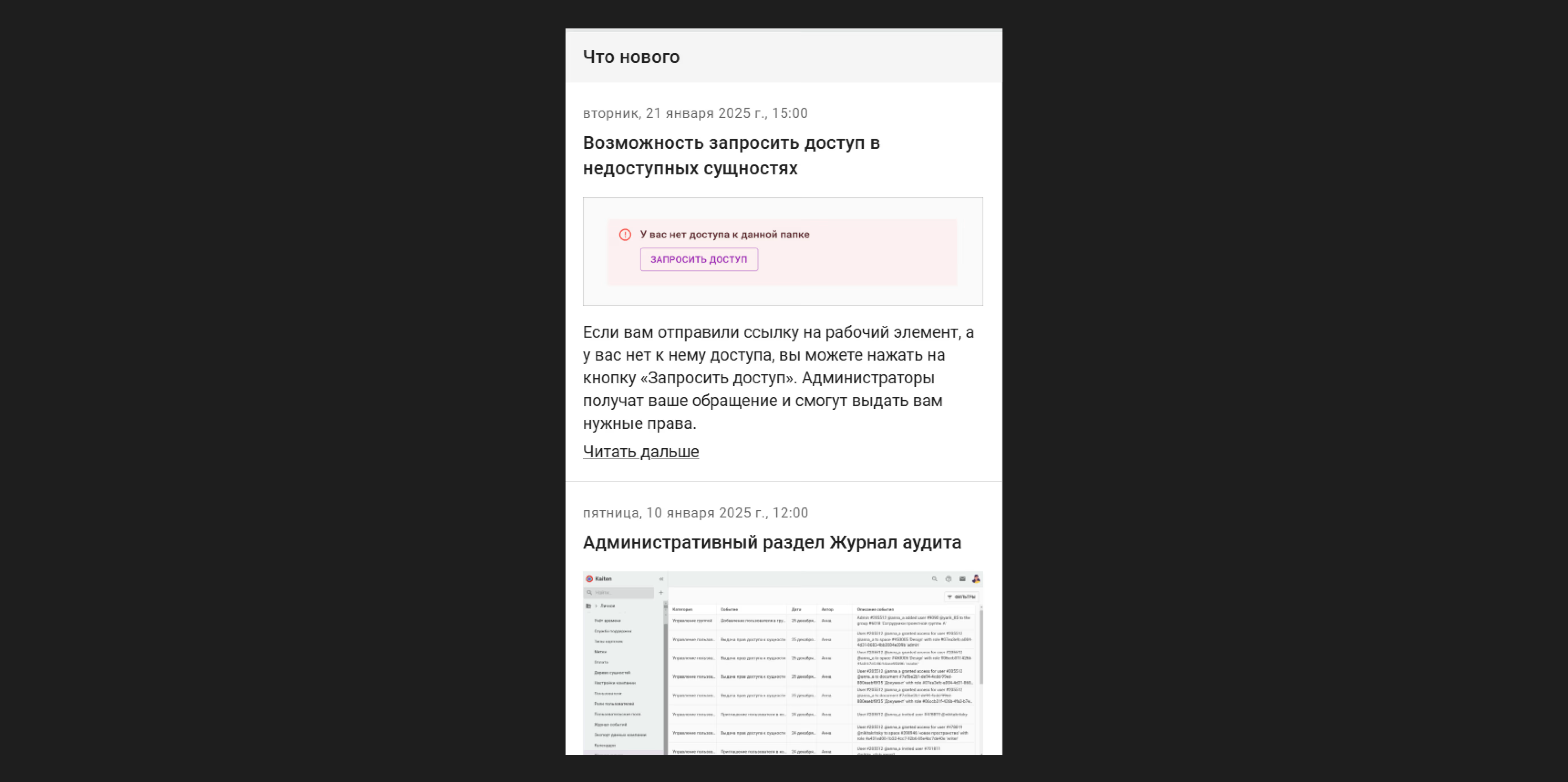
Once a quarter or once a month, you can send a digest as a roundup. It summarizes all the changes made during that period.
Which way a company notifies users depends on how often it ships and how big each release is.
Why feedback-driven development is hard and not always possible
Collecting feedback lets you prioritize requests, plans and product ideas when people and time are scarce. It's a way to choose what to build first when you don't have a large development team yet.
If the team lacks resources, the development queue is overflowing and the product has obvious flaws, collecting feedback can backfire.
Important: the challenge with collecting feedback is managing customer expectations. When customers share their concerns about the product, they hope their words will shape its improvements. But if we show up with a survey for the third time in a year without having built anything they asked for in 12 months, it will cause frustration and hurt customer loyalty.
There are other challenges with feedback-driven development too:
- Hidden needs. Users can't always clearly explain what they want. They may talk about one tool but need something else entirely.
- "Noise" in feedback. Some feedback may be subjective, emotional or simply irrelevant. You need to be able to filter information and pick out what matters.
- Technical infeasibility. Some user ideas may be technically hard or even impossible to build.
Keep in mind. Not every user will like changes to the product, even if they're based on feedback. Be ready for criticism and know how to handle it constructively.
Building a feature based on customer feedback at Kaiten
Let's look at real examples from our work at Kaiten.
Example 1. User request: "I open a link, but the item isn't available"
Request details: some team members can't access certain items, and it's unclear how to get access.
The solution we found. Users themselves suggested a fix: add a label showing who the project or item admin is. That way you could contact the right person directly and get the permissions you need.
How it was built in Kaiten. The Kaiten team added a request access button, and that solved the problem for users.
Example 2. A bug in the "Personal" section
The problem. The team found a bug in the "Personal" section that could only be fixed by changing the whole section. Developers made the changes quickly to get rid of the problem.
Request details. After the fix, customers started complaining that the section had become inconvenient and that losing the split between urgent and non-urgent tasks was a major drawback.
The solution we found. Support collected complaints about the inconveniences after the changes.
How it was built in Kaiten. The team updated the section again, taking the audience's feedback into account.
 The simplest tools don't get complaints or questions from users
Is feedback-driven development the right approach?
It is, but you shouldn't blindly build everything users ask for.
Stick to 2 key rules:
- Don't treat feedback as a to-do list. Look at the user's previous few steps to understand their journey and problem and find the best solution.
- Account for every possible scenario in a mass-market product. You can't build a service around the needs of one customer, even if they're considered key for the company.
For example, say a company has 1,000 developers and 10 customers. Even then, you can't take a request from one user and build the product around it. The only case where you should build everything a customer wants is if the product is made just for them and their needs. Even then, think the implementation through several steps ahead, because the customer can't foresee every possible conflict.
So yes, you need to take feedback into account, but without going overboard. Collecting feedback is a bit like going to the doctor. A good doctor won't just prescribe painkillers when you say "my stomach hurts." They'll figure out the cause and prescribe the right treatment. Product development works the same way: you need to dig in and build a well-rounded solution that fixes the root causes.