Internal communication: how to build a system that works
What an internal communication system includes, which channels a company needs, who owns them and how to tell whether it's all working.

Your company has fifty people. Work questions get sorted out across three messaging apps, tasks arrive as voice messages, and the final version of the contract is "somewhere in the chat with Emily." A new hire spends two weeks figuring out who to ask about time off, and only half the team read the announcement about the office move. Sound familiar? Then your internal communication grew on its own, and it's time to build it on purpose.
In this article, we break down what an internal communication system is made of, which channels handle what and how to get things in order in five steps, with no dedicated department and no consulting budget.
What is internal communication
Internal communication is how information flows inside a company: between leadership and employees, between departments and within teams. It's also called corporate communication. External communication is aimed at customers, partners and the media. Internal communication is aimed at your own people.
An internal communication system has four parts:
- channels: where information lives, such as your team chat app, knowledge base, meetings and email newsletters;
- rules: what to post where, how fast to reply and what counts as urgent;
- owners: who makes sure the rules work and the channels don't fill up with noise;
- metrics: how the company knows information is getting through.
If any part is missing, ad hoc habits fill the gap: everyone picks their own channels, rules get passed along by word of mouth, and the company only learns communication has broken down from the fallout: missed deadlines and people who quit because they "never knew what was going on."
Types of internal communication
There are lots of ways to classify it, but two are useful in practice.
By direction. Vertical communication runs between leadership and employees: goals, decisions and announcements flow down, while reports and feedback flow up. Horizontal communication runs between colleagues and departments, and it's where most work conversations happen. Diagonal communication runs between people in different departments and at different levels, which is common on project teams.
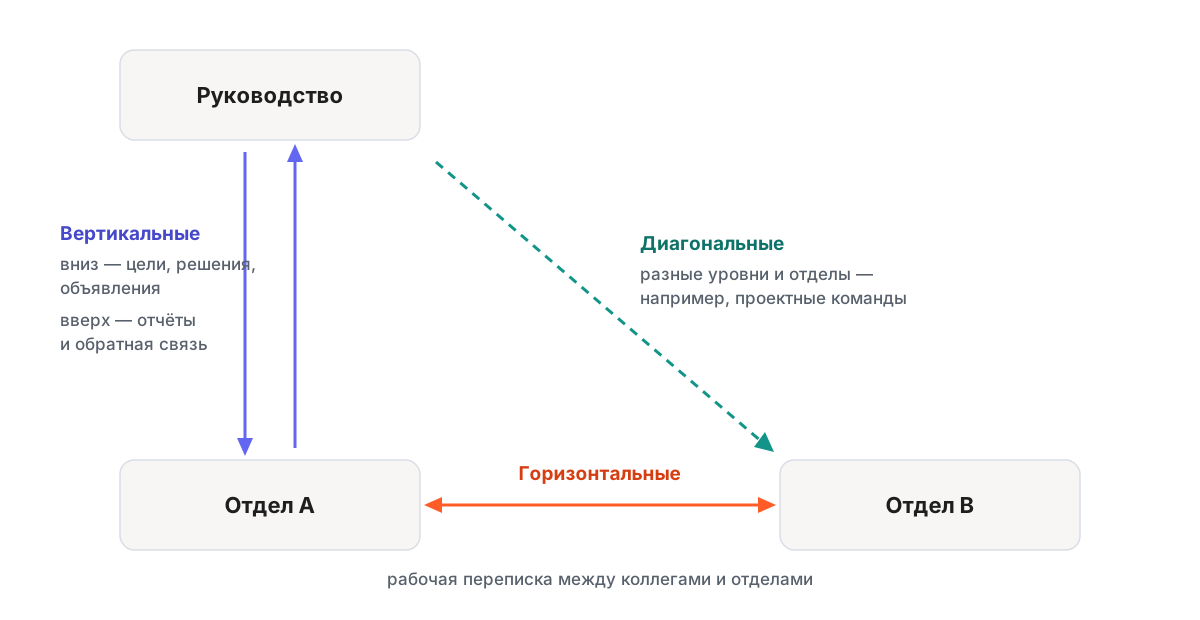
This split helps you diagnose problems, because each direction fails in its own way. If top-down communication breaks, the team learns about decisions through rumors. If bottom-up breaks, leadership lives on reports that don't match reality. If horizontal breaks, departments duplicate each other's work.
By format. Formal communication covers announcements, policies and meetings: anything set by rules. Informal communication covers lunch conversations, congratulations and small talk in your team chat app. You don't need to regulate informal communication, but you do need to keep it separate: a watercooler chat exists precisely so memes don't end up in the releases channel.
What breaks without a system
Internal communication problems rarely look like "we're bad at communicating." They look like everyday situations everyone has gotten used to wasting time on:
- Information gets lost. A decision was made on a call but never written down, so a month later the question gets discussed all over again.
- Channels overlap. Part of the team is on Telegram, part on WhatsApp, and documents live in email. To get the full picture on one project, you have to check three places.
- Announcements get buried. An important message about the new approval process went to the general chat and got pushed out of view by two hours of chatter about parking.
- New hires are left on their own. No document answers "how do we do things here?" The knowledge lives in people's heads.
This costs money, and it's easy to calculate. If each of 50 employees spends 15 minutes a day looking for information (which chat it was discussed in, where the latest version is, who to ask), the company loses 12.5 hours every day. That's a day and a half of work, every day, spent just finding things that have already been written.

Internal communication channels: what each one is for
The core principle: each type of information gets its own channel. When one channel handles everything, it turns into a feed where a release announcement sits next to a lunch discussion, and it stops working for both.
| Channel | What it's for | How to recognize the information |
|---|---|---|
| Team chat app: chats, threads | Day-to-day discussions, work questions | Needs an answer today |
| Announcement channel | Company news, policy changes | Everyone needs to see it |
| Knowledge base | Policies, guides, decisions | You'll need it a month from now |
| Meetings and video calls | Open-ended discussions, contentious issues | Faster to talk through than to type out |
| Surveys | Feedback from the team | You need everyone's opinion, including the quiet ones |
The split works both ways. It tells people where to post and where to look. If policies always live in the knowledge base, nobody scrolls through March's messages hunting for the rules on requesting time off.
A separate question is where all of this should live. When chats are in one service, calls in another and the knowledge base in a third, separating channels turns into a zoo of browser tabs. That's why companies bring work communication into a team chat app: chats, threads, calls and announcements in one place that the company controls, not employees in their personal accounts.
How to build internal communication in five steps
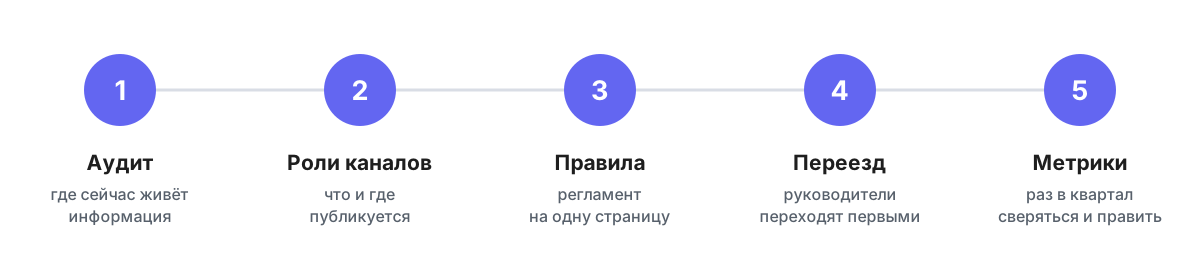
Step 1. Run an audit
List where work information lives today: which chats exist, in which services, what gets discussed in private messages and where documents are stored. Usually this step alone reveals the big picture: how many parallel channels popped up on their own and how much work conversation happens in places the company has no access to.
It's handy to pull the results into a communication map, a table of "type of information → channel → owner." It'll also become the backbone of your rules in step three.
Step 2. Give every channel a role
Decide what lives where and write it down: day-to-day work in the team chat app, announcements in a separate channel with limited posting rights, documents in the knowledge base. Keep the roles few and the boundaries clear enough that anyone can answer "where do I post this?" in a second.
Step 3. Write your communication rules
A short policy works better than a detailed one: one page people will actually read. What goes in it: when to expect a reply, what counts as urgent, when to call instead of typing and how to write messages so people can respond to the point. We covered this in detail in our article on business etiquette in team chat apps.
Step 4. Make the move, starting with managers
Rules stick through example, not orders. If the CEO keeps writing in WhatsApp, the team will stay in WhatsApp, whatever the policy says. Managers move first, reply in the new channels and steer stray discussions back where they belong: "moved this to the project chat, I'll reply there." This daily practice is what builds an internal communication culture. The policy just writes it down.
Bring new hires in right away: access on day one and a short guide to "how we communicate here," so they're in the loop from the first day instead of playing catch-up.
Step 5. Measure and adjust
Check in once a quarter: is the channel split working, have new ad hoc chats appeared, are announcements getting through? We cover what to measure below.
The rules that save the most time
Every company's policy is its own, but a few rules pay off almost everywhere:
- Keep work in work channels. As soon as task discussions move to personal messaging apps, the company loses access to them: when someone leaves, their conversations leave with them.
- Public chats by default. Make chats private only when there's a reason, like finance or HR matters. When discussions are open, most questions can be answered with a search instead of polling colleagues.
- One discussion, one thread. Threads keep twenty conversations from getting tangled in one feed. We explained how it works in our article on cross-chat threads.
- Announcements without discussion. Only a few people post in the news channel, and comments go into threads. That way, announcements don't get lost and you can find them a month later.
- Not everything needs a reply right now. Agree on a norm: messages in shared chats get a reply within the workday, and anything urgent is clearly marked. This removes the biggest source of chat fatigue: the pressure to respond instantly.
Common mistakes when building a system
Four mistakes come up more than any others, and all of them are fixed with rules, not tools:
- Posting everywhere. An announcement goes out in the team chat app, by email and in the general chat "just to make sure people see it." It backfires: when everything arrives everywhere, people stop reading all of it. Each message needs one home.
- One-way broadcasting. There's a news channel but no way to respond. Build feedback in right next to the updates: threads under announcements, surveys and regular answers from leadership to the team's questions.
- A channel with no owner. A chat nobody looks after fills up with noise within a quarter and becomes a place where it's pointless to look for anything important.
- A tool for the sake of a tool. A company rolls out a portal "because everyone has one," while real communication stays in the chats. Do it the other way around: first understand how the team actually communicates, then pick a tool that fits.
Who owns internal communication
It depends on the size of the company, and that's normal.
- Up to 50 people: the founder or COO. You don't need a separate role. What matters is that one person owns the rules and can change them.
- 50–300 people: usually HR, since internal communication directly affects onboarding and retention. Department heads own communication within their teams.
- 300+ people: a dedicated internal communications manager or team appears to handle company news, surveys, engagement and channel upkeep.
The title can be anything. The only setup that doesn't work is "everyone owns it," because that means nobody does.
How to tell whether communication is working
You can measure internal communication effectiveness if you look at behavior, not gut feeling:
- Announcement reach: what share of employees read the news channel. If only half the team sees announcements, the channel isn't working.
- Response time: how long people wait for an answer in shared chats. Days instead of hours means questions are being asked in the wrong place or of the wrong people.
- Share of discussions in public channels. If work decisions keep getting made in DMs, the system only exists on paper.
- Pulse surveys: short, regular surveys of 3–5 questions, such as whether people understand what's happening in the company and whether they have enough information to do their jobs. The trend matters more than the absolute numbers. We wrote about working with this data in our article on team engagement.
Building internal communication takes a couple of weeks, not a year: an audit, channel roles, a one-page policy, the move and metrics. After that, the system mostly runs itself, as long as it has an owner and managers play by the same rules.
If you want all your work communication in one place (chats, threads, announcements, calls and surveys), try Pachca: the free plan is enough to test the system with your team.
Frequently asked questions
The audience. External communication is aimed at customers, partners and the press, while internal communication is aimed at the company's employees. The tools differ too: external uses advertising, PR and social media, while internal uses a team chat app, a knowledge base, meetings and surveys.
By direction: vertical (between leadership and employees), horizontal (between colleagues and departments) and diagonal (across levels and departments, for example on project teams). By format: formal communication set by rules, like announcements, policies and meetings, and informal communication, from lunch conversations to small talk in your team chat app.
Four elements: channels (where information lives), rules (what to post where), owners (who keeps things in order) and metrics (how you can tell information is getting through). A system starts when all four are written down.
The founder or COO. Up to 50 people, you don't need a separate role. It's enough for the rules to be written down and have one owner. As the company grows, the function usually moves to HR, and large organizations have a dedicated team.
The minimum set: a team chat app for day-to-day communication, an announcement channel, a knowledge base for policies and guides, video calls for discussions and surveys for feedback. The fewer services cover all of this, the simpler the system: every new tool is one more place people have to search.
By how your team behaves: announcement channel reach, response time to questions in shared chats, the share of work discussions in public channels and pulse survey trends. A drop in any of these shows up before anyone puts the problem into words.
Start with an audit: list every chat and the agreements that live in them. Then choose the work environment where day-to-day communication will move, give channels roles and make the move, starting with managers. A one-time move works better than a gradual one: as long as both environments are alive, everyone keeps writing in the old one.