What are multi-agent systems and when do you need one
How several AI agents split one task, what the common patterns are, when such a system pays off and how agents work alongside a team in a team chat app

How to connect your own AI agent to Pachca
A multi-agent system is several AI agents working together on one task. Each agent handles its own part of the work: one gathers information, another turns it into a report, a third checks the result. The work is split between them by a lead agent or by a person. Build such a system when a task breaks into independent parts or the result needs an outside check. In other cases a single agent will do the job cheaper and more reliably.
What an AI agent is
A chatbot answers a question. An AI agent takes a task and carries it out: it searches the web, reads files, creates a task in a tracker, writes code. The agent picks its next action based on the result of the previous one. We covered how an agent differs from a chatbot in a separate article.
Agents are combined into systems because of a limit on volume. Everything an agent knows about a task has to fit into its context window, the amount of text a model takes into account at once. That includes instructions, documents, search results and every intermediate step. The longer the task, the more text piles up and the higher the risk that the agent misses an important detail.
How a multi-agent system works
In a multi-agent system, a task is split between several agents. It's similar to how a project team works: a lead breaks the task into parts, hands them out to specialists and puts the result together. Each agent gets separate instructions, tools and access, and its context window holds only its part of the task.

The lead agent is called the orchestrator, and the agents it hands subtasks to are called workers or subagents. The orchestrator decides who does what and passes each one the data it needs. We covered how agents coordinate in the Agent orchestration entry of our glossary.
Common patterns
Orchestrator and workers. The lead agent makes a plan and hands out subtasks. Workers can run in parallel. This is how the Research mode works in Claude, Anthropic's AI assistant: the lead agent plans the research, several subagents search different directions at the same time, and then the lead agent turns their findings into a report. In 2025, on Anthropic's internal evaluation, this system scored 90% higher than a single agent.
Pipeline. Agents work one after another, and the output of one becomes the input of the next. In customer support, for example, the first agent identifies the topic of a request, the second looks for an answer in the knowledge base, the third writes a draft for the support rep. The order of steps is fixed, so you can see right away at which stage an error appeared.
Worker and reviewer. One agent does the work, the second checks it against set criteria and sends it back for fixes if it finds mistakes.

When one agent isn't enough
Start with one agent. Add a second one in three cases.
The task breaks into independent parts. Say you need to research twenty competitors. A single agent has to hold data on all twenty in its context window at once, and by the end it mixes up details. Several subagents take one company each and work in parallel.
Different parts of the task need different access. An agent that answers customers doesn't need access to the code, and a developer agent doesn't need the customer database. If you split them, each gets only its own permissions and a short instruction.
You need an independent check. An agent that did the work checks it with the same assumptions and misses its own mistakes. A reviewer agent never saw how the task was solved and judges only the result, so it catches missed requirements and factual errors.
What it costs
The system is more expensive. Each subagent reads its own instructions and builds its own context from scratch, so a task split between agents uses more tokens than the same task handled by one agent. Tokens are the units used to measure text and to bill for a model's work.
Agents don't see each other's decisions. Each worker knows only its part of the task and makes decisions along the way that the others don't know about. Cognition, the company behind the AI software engineer Devin, gives a hypothetical example: two agents are asked to build a Flappy Bird clone. The first draws a background in the style of Super Mario, the second one's bird comes out in a different style, and the parts can't be put together into a game. Anthropic also writes that the pattern doesn't fit tasks with interdependent parts, and counts most programming tasks among them.
With an orchestrator, errors are harder to track down. If the final result is wrong, you have to go through the chain of handoffs between agents: who got incomplete data, who misread a subtask.
How agents work alongside a team
When both agents and people work on a task, progress is visible only if it happens in one place. If each agent works in its own window, a person carries results between them: retells what was agreed and forwards the answers. When agents work in the same conversation as the team, everyone sees the same history, and people can step in at any point.
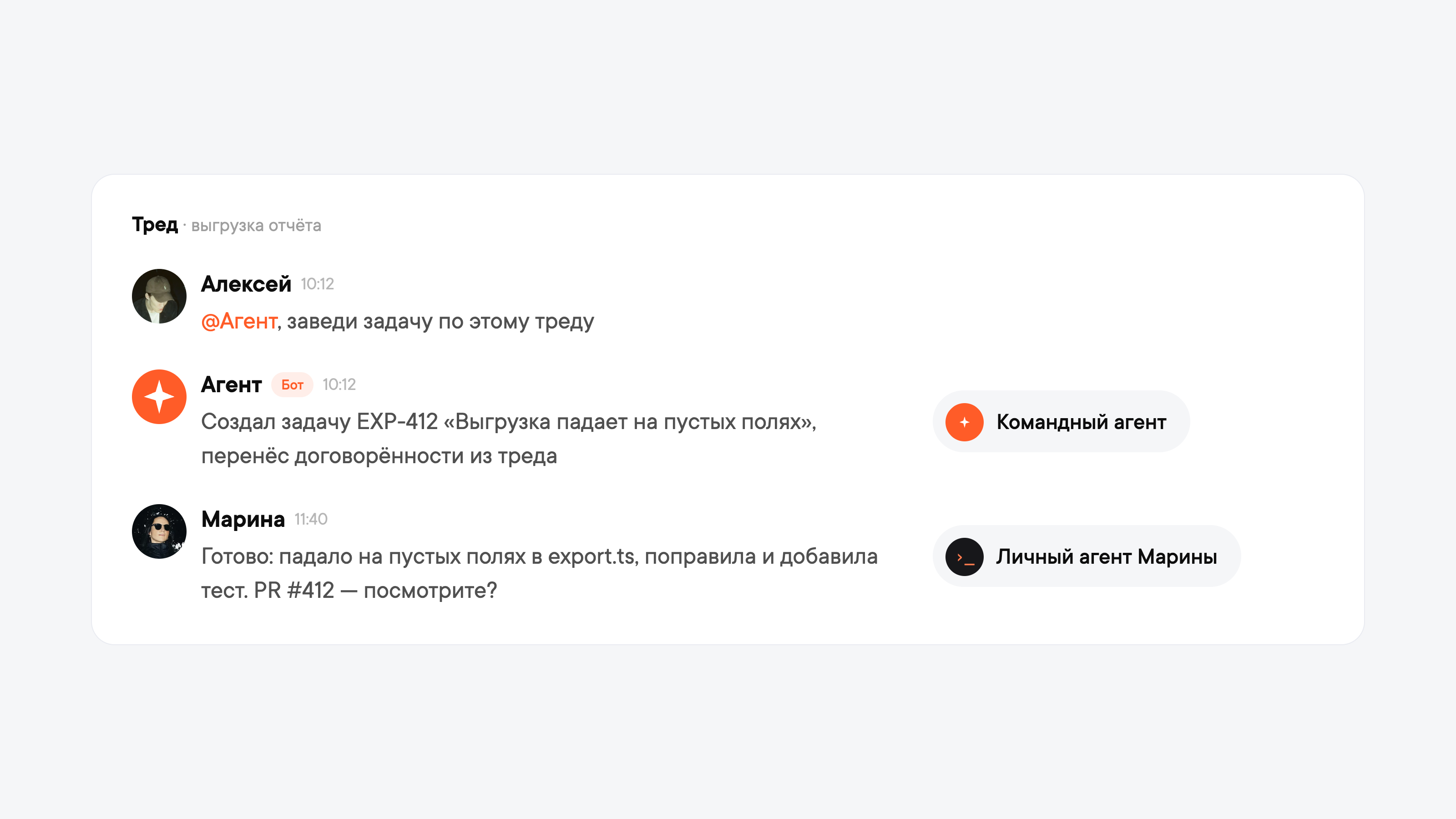
In Pachca, that place is a thread, a discussion under a specific message. There are two kinds of agents in Pachca. A team agent is built by the team itself and connected as a bot: colleagues @mention it in a thread, and it replies there. A personal agent (Claude Code, Cursor or Codex) is connected by an employee to their own account. The employee gives it a link to the thread, and the agent posts on the employee's behalf.
In such a thread, people act as the orchestrator: they decide which agent does what and check the result. For example, the team discussed a bug in a report export in a thread. A manager @mentions the team agent and asks it to create a task. The agent creates it in the tracker and carries over what was agreed. A developer gives their agent a link to the thread. The agent reads the discussion, fixes the bug, sends the code for review and posts in the thread what it fixed and what needs checking.
If the task needs a colleague from another department, you @mention them in the same thread. Threads in Pachca are cross-chat threads, so the colleague sees the whole history, including the agents' work, even if they aren't in the original chat.
A team agent sees public channels and only the private chats it has been added to, while a personal agent sees the same as the employee. We covered the other differences in Personal vs. team AI agents.
To start, one agent doing one recurring job is enough, such as summing up long discussions.
Frequently asked questions
Developers use ready-made libraries such as LangGraph, CrewAI or Claude Agent SDK. Without coding, chains of agents are built in automation services such as n8n, where a lead agent calls other agents as tools.
An agentic workflow is a process where a language model chooses the next step. A single agent can run it. A multi-agent system splits that process between several agents.