Adesk + Pachca integration
Financial tracking in your team chat app

Adesk lets you keep detailed financial records for your company, keep all your key metrics at hand and make data-driven decisions. To make this even easier, you can integrate Adesk with Pachca. That way, you stay on top of your company's finances while you work and talk with colleagues.
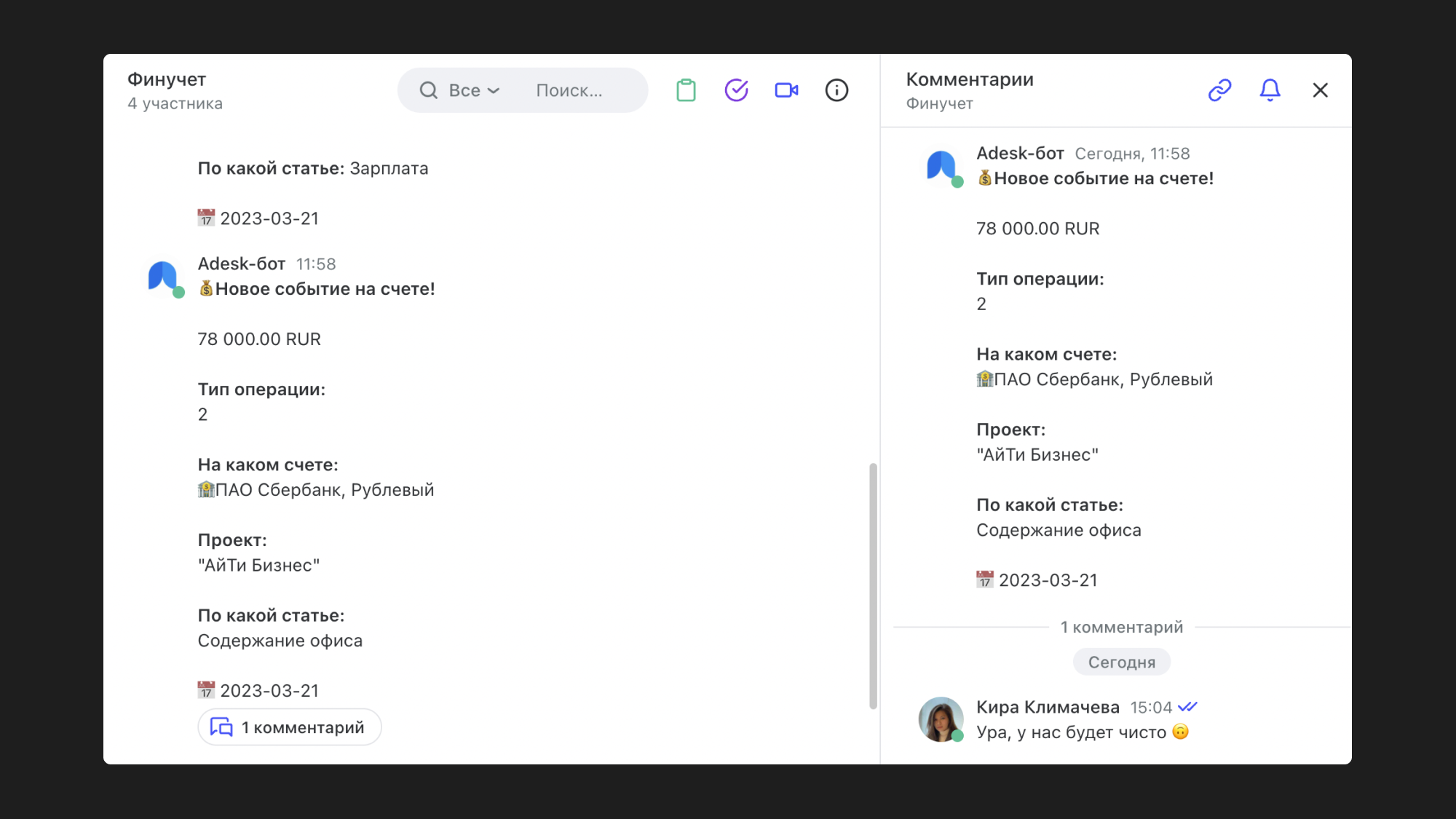
A bot runs in Pachca. You add it to chats, and it posts updates about your company's finances there.
What Adesk data you can send to Pachca:
- Incoming and outgoing payments
- Counterparties
- Projects being created and completed
- New obligations (someone owes you a payment, or you owe someone)
What to use the integration for:
For example, you can use it to monitor every incoming payment to your company. Adesk gets data from your banking services when money lands in your account and sends it straight to Pachca. That way, your finance team stays in the loop on everything that's happening.
With the Adesk integration, you can also see which counterparties now owe you and which ones have already paid up. It works the same way when your company takes on an obligation to someone else. Adesk notifications in Pachca help you catch everything important in time.
How to set up the integration
You need to set up a webhook in Adesk and connect it to Pachca. We cover how to do this in our articles on webhooks and bot message templates. For more ready-made ways to connect Pachca with your work tools, see our integrations overview.