The best team chat apps of 2024
What companies are choosing in 2024: hands-on platform testing and reviews from organizations of every size.

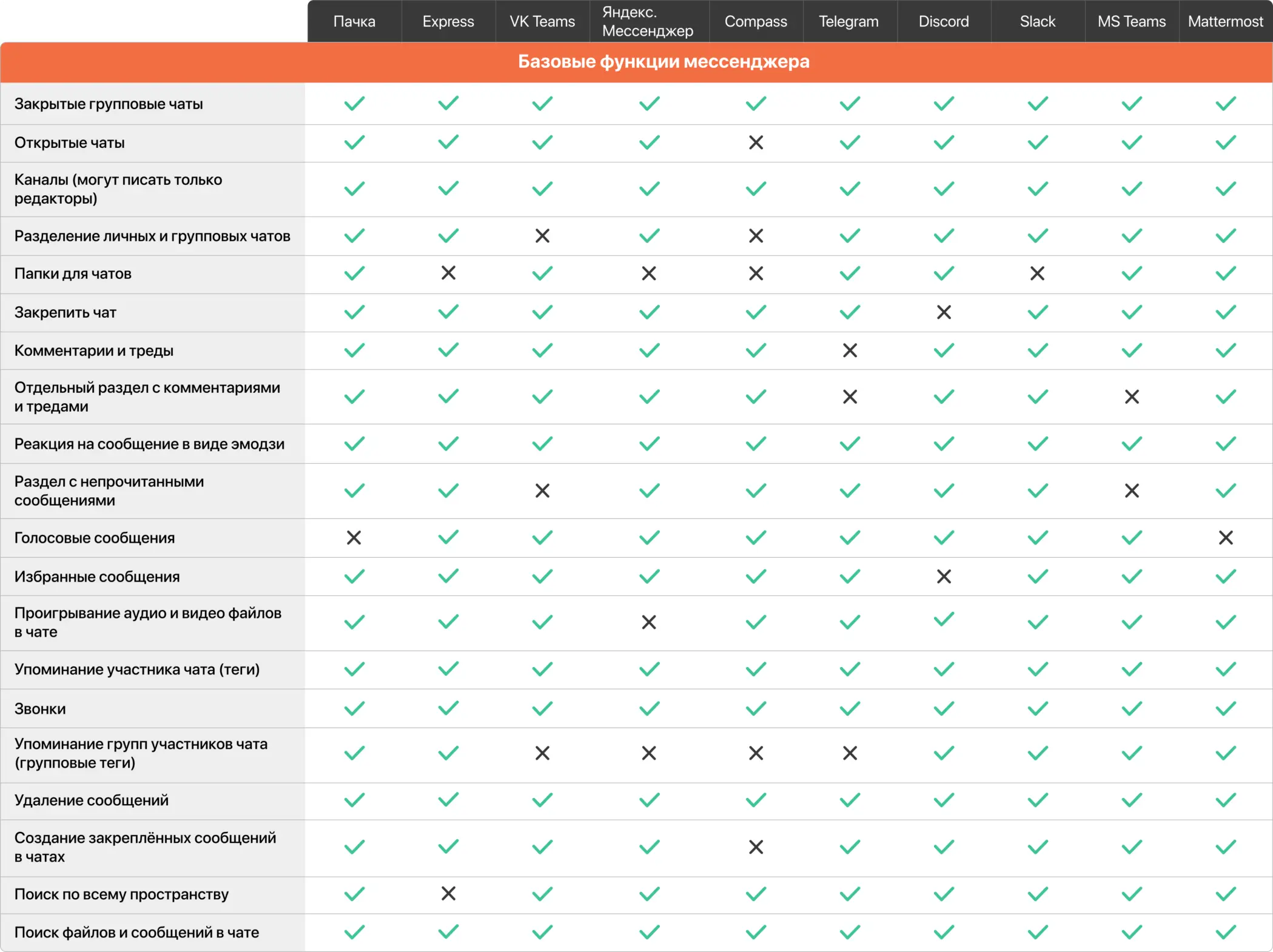
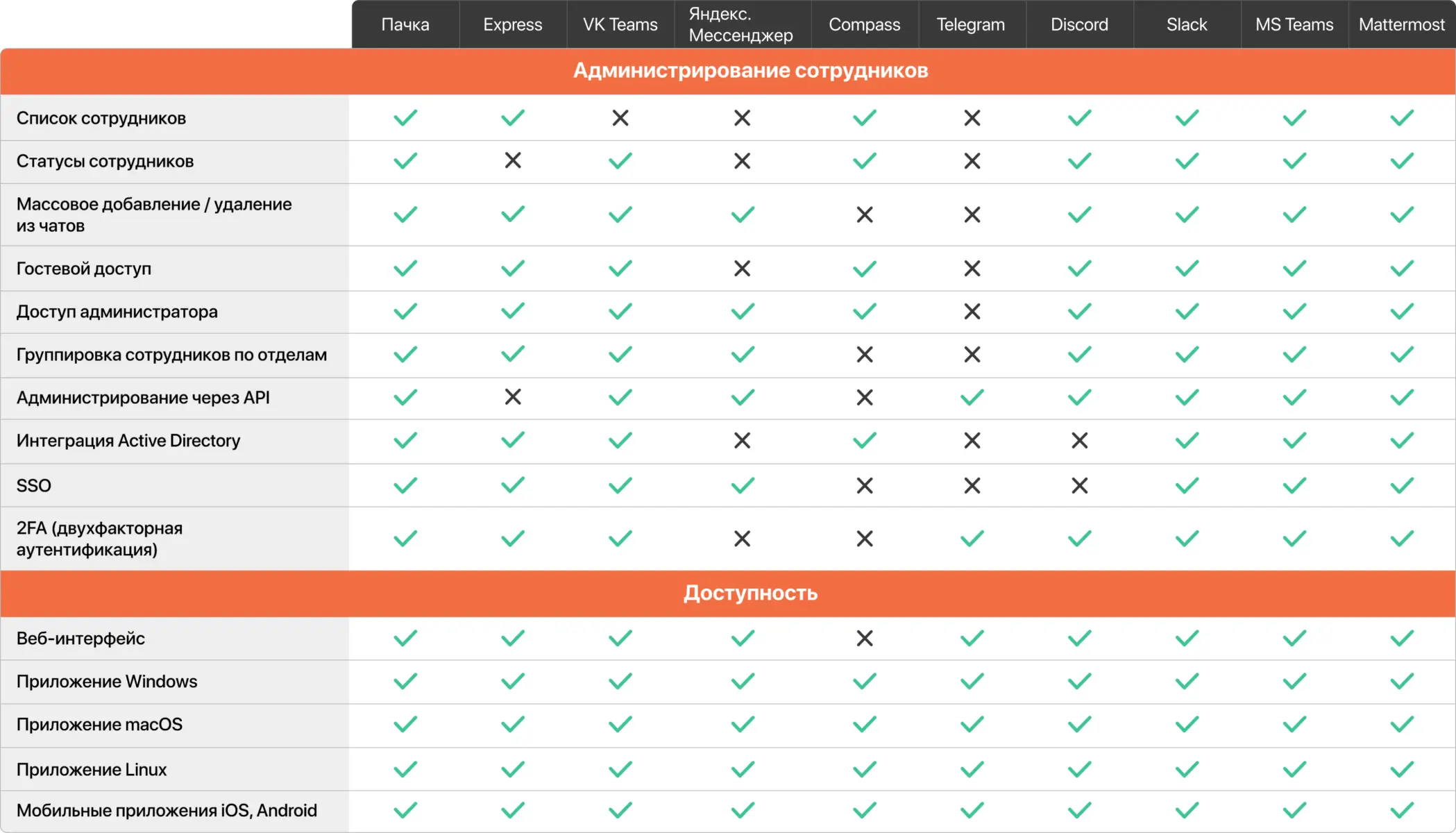
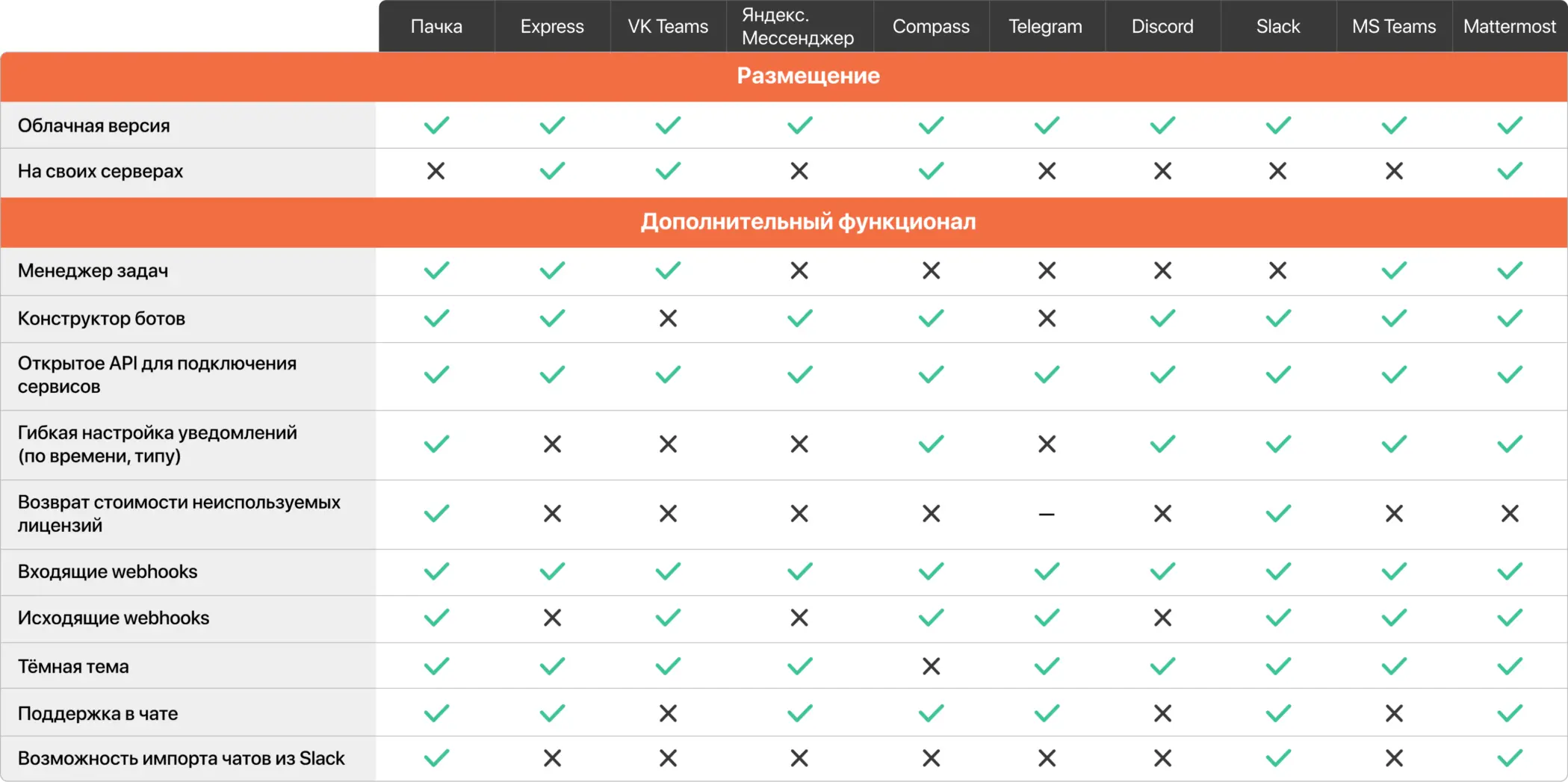
This is the Pachca team's roundup of the best team chat apps of 2024 (see our similar articles for 2022 and 2023). Below, we describe each service, list its pros and cons and add some extra context to help you pick the right one. At the end, you'll find a table comparing 17 team chat apps across 46 features 🔍
If you're specifically interested in video conferencing, we have a separate guide to choosing a video conferencing platform for business with a checklist and selection criteria.
This year, we've added a few new things to the app descriptions:
- What each service's UI looks like in use.
- Our take on where each product is headed in the near future.
- We only cover the most popular players in each category. There are more team chat apps on the market than we describe here. You'll find the rest at the end of the roundup, where we've linked to our updated team chat app comparison table.
Contents:
Russian team chat apps
International team chat apps
Consumer messaging apps
Russian team chat apps
Since last year, Russian solutions have kept improving their core features and overall user experience. At the same time, they've started adding features Russian users know from Telegram.
The upsides of Russian team chat apps: a Russian-language interface, protection from blocking and pricing in rubles that doesn't climb with foreign exchange rates.
The downsides: they still need to raise their quality and catch up on the features people expect from a team chat app.
Pachca
Pachca is a team chat app for large and midsize businesses with advanced integrations and AI agents.
The focus is on building an advanced team chat app rather than an ecosystem of business tools. Instead, Pachca bets on an open platform: bots, AI agents and integrations with work tools. It's developed by Primavera, an independent company focused entirely on the quality of its team chat app.
Since March 2022, Pachca has shipped updates every two weeks, so it's nearly on par with international solutions when it comes to core work features. Other highlights: extensive webhook support, a public API for integrating with your own scripts and other services and for automating admin tasks, a CLI and SDK, a plugin in the official n8n catalog, cross-chat threads, video meetings for up to 1,000 people and a built-in task manager.
AI agents are a separate focus. You connect a personal agent (Claude Code, Cursor, Codex) through the CLI: it reads chats and threads and pulls task context straight from the discussion. A team agent is set up as a bot that colleagues @mention in threads.
Where it's headed:
Pachca will keep improving the app and every way people communicate in it. Expect new ways to communicate, without cluttering the interface with third-party services.
The product is being built so modern IT, digital, EdTech and retail teams can work comfortably in it. For example, Lamoda, Skillfactory, Burger King, DocsInBox, MIPT and others already use it.
Platforms:
- Web
- Desktop apps (Windows, macOS, Linux)
- Mobile apps (iOS, Android)
- Cloud version and hybrid on-premise (BYOK)
Pricing:
- from 159 ₽/mo per user, support included
- from 399 ₽/mo per user with SSO and Active Directory
- 20% off with annual billing and 75% off for educational organizations and nonprofits
- Chat history import from Slack available
eXpress
eXpress is built around one thing: maximum communication security.
You can install it on your own servers, all traffic has two layers of encryption, and there's a privacy mode with auto-deleting messages, password-protected online meetings and much more. Beyond its beefed-up security, eXpress covers the important basics: a catalog of bots and apps, custom automations, threads, video meetings and more.
But people often point out that the interface and features are basic for a business solution: there are no group calls, and customization options for the interface and notifications are limited.
It's a good fit for companies and government organizations that need secure communication integrated with their business processes. Its customer stories include rollouts at small, midsize and large businesses as well as in the public sector.
Where it's headed:
eXpress is evolving into an enterprise super app built around the needs of businesses and government agencies. Its priorities are driven by what its key customers ask for: stronger security, a growing ecosystem of built-in apps for automating business processes, better access management and better video calls.
Platforms:
- Web
- Desktop apps (Windows, macOS, Linux)
- Mobile apps (iOS, Android)
- Cloud version available, can be installed on your own servers
Pricing:
- From 150 ₽/mo per user for the cloud version
- Custom pricing for the self-hosted version
VK Teams
VK Teams is a team chat app from VK.
It covers the basics: chats, video calls, threads and integrations with VK services and third-party apps. You can also install it on your own servers.
The downsides: limited admin options for managing employees and chats, and a small selection of integrations compared with other team chat apps. Some users also say the interface is overloaded with features and not always intuitive.
It's a good fit for companies that already use the VK ecosystem and want to integrate their team chat app with other VK services.
Where it's headed:
VK Teams is developing as part of the VK ecosystem, so expect tighter integrations with other VK services and improvements to its core features.
Platforms:
- Web
- Desktop apps (Windows, macOS, Linux)
- Mobile apps (iOS, Android)
- Cloud version available, can be installed on your own servers
Pricing:
- From 199 ₽/mo per user for the cloud version
- Custom pricing for the self-hosted version
Yandex Messenger
Yandex Messenger is a team chat app from Yandex and part of the Yandex 360 ecosystem.
It covers the basics: chats, video calls, threads and integrations with Yandex services. It can't be installed on your own servers: it only runs in the Yandex cloud.
The downsides: limited admin options for managing employees and chats, and a small selection of integrations compared with other team chat apps. Some users also say the interface isn't always intuitive.
It's a good fit for companies that already use the Yandex ecosystem and want to integrate their team chat app with other Yandex services.
Where it's headed:
Yandex Messenger is developing as part of the Yandex ecosystem, so expect tighter integrations with other Yandex services and improvements to its core features.
Platforms:
- Web
- Desktop apps (Windows, macOS, Linux)
- Mobile apps (iOS, Android)
- Cloud version only
Pricing:
- From 199 ₽/mo per user for the cloud version
Compass
Compass is a team chat app for a range of industries: design agencies, startups and small businesses
It covers the basics: chats, video calls, threads and integrations with third-party apps. You can also install it on your own servers.
The downsides: limited admin options for managing employees and chats, and a small selection of integrations compared with other team chat apps. Some users also say the interface isn't always intuitive.
It's a good fit for small teams that need a basic team chat app they can install on their own servers.
Where it's headed:
Compass is developed by Biznes Resheniya, so expect more integrations and improvements to its core features.
Platforms:
- Web
- Desktop apps (Windows, macOS, Linux)
- Mobile apps (iOS, Android)
- Cloud version available, can be installed on your own servers
Pricing:
- From 199 ₽/mo per user for the cloud version
- Custom pricing for the self-hosted version
International team chat apps
International team chat apps have mature features and lots of integrations. But they come with major downsides for Russian companies: the risk of being blocked, payment only with foreign cards and no Russian-language support.
Slack
Slack is one of the most popular team chat apps in the world.
Slack has mature features: chats, video calls, threads, a huge number of integrations, a bot platform and customizable interface and notifications.
The downsides for Russian companies: in March 2022, Slack started blocking Russian workspaces, and in September 2024 it stopped serving users from Russia. You can only pay with a foreign card, and you can't sign up for a new workspace without getting around the blocks. Slack also doesn't support Russian.
It's a good fit for companies with offices abroad that can pay with foreign cards.
Where it's headed:
Slack continues to evolve as a collaboration platform with a focus on integrations and automation. In the near future, expect better video calls, stronger AI features and more automation options.
Platforms:
- Web
- Desktop apps (Windows, macOS, Linux)
- Mobile apps (iOS, Android)
- Cloud only
Pricing:
- From $7.25/mo per user on paid plans
- Free plan with limitations
Microsoft Teams
Microsoft Teams is a team chat app from Microsoft and part of the Microsoft Office365 ecosystem.
Teams has mature features: chats, video calls, threads, lots of integrations with Microsoft services and third-party apps, and the option to install it on your own servers.
The downsides for Russian companies: in March 2024, Microsoft announced it would block access to its cloud services in Russia. The higher risk of losing access and the inability to pay through Russian banks led many companies to switch to Russian solutions.
It's a good fit for companies with offices abroad that can pay with foreign cards and already use the Microsoft ecosystem.
Where it's headed:
Microsoft Teams is developing as part of the Microsoft ecosystem, so expect tighter integrations with other Microsoft services and improvements to its core features.
Platforms:
- Web
- Desktop apps (Windows, macOS, Linux)
- Mobile apps (iOS, Android)
- Cloud version available, can be installed on your own servers
Pricing:
- From $4/mo per user on paid plans
- Included in a Microsoft 365 subscription
Mattermost
Mattermost is an open source team chat app.
Mattermost has mature features: chats, video calls, threads, lots of integrations, a bot platform and a customizable interface. You can install it on your own servers.
The downsides: you need technical support to install and configure it on your own servers, and the interface is more complex than other team chat apps. Also, if you customize the code for your needs, your customized Mattermost will get harder to maintain over time, because it won't be compatible with the developer's updates.
It's a good fit for companies with a technical team that want full control over their data and are ready to maintain the app themselves.
Where it's headed:
Mattermost continues to evolve as an open source solution with a focus on security and customization. In the near future, expect better video calls, stronger security and more integration options.
Platforms:
- Web
- Desktop apps (Windows, macOS, Linux)
- Mobile apps (iOS, Android)
- Cloud version available, can be installed on your own servers
Pricing:
- Free if you install the open source code on your own servers
- From $10/mo per user for the full-featured cloud version, payable only with a foreign card
- Custom Enterprise plans
Consumer messaging apps
Consumer messaging apps work well for personal conversations, but they're not the best choice for work communication. They offer limited ways to organize communication: there's no flexible management of employees and chats, important files can leak to third parties, and you can't control who has access to information.
On the plus side, all the core features work well, and they're free.
Telegram
Telegram is one of the most popular personal messaging apps in the world, and many companies use it as a team chat app.
Teams of all sizes use it for work, from small teams to large companies. People most often praise its easy, intuitive interface, its speed and its many unusual updates.
But as a business solution, it gets criticized for its lack of admin tools for managing employees, limited integration flexibility and the fact that anyone can forward company information to outside users. When it comes to separating personal and work conversations, you can sort Telegram chats into folders, but it's hard to work with lots of chats, since conversations on different topics get mixed together.
It's a good fit for small teams with a limited number of chats that just need simple messaging.
Where it's headed:
It's safe to say Telegram will add more features you can't find in other consumer messaging apps. In the near future, expect improvements to Telegram's bot platform, since bot development keeps getting more popular. You can also expect new paid features aimed at work and learning.
Platforms:
- Web
- Desktop apps (Windows, macOS, Linux)
- Mobile apps (iOS, Android)
- Cloud only
Pricing:
- Free
- Telegram Premium: 299 ₽/mo
Discord
Discord is a consumer messaging app that's often used as a team chat app.
That's because it has some features other consumer messaging apps don't, like threads and advanced chat admin tools.
The downsides: users need training, and the interface is complex and unintuitive for work.
It's a good fit for young, modern teams of any size.
Where it's headed:
Discord was originally built as a chat app for gamers. Today, it's evolving into a service for young, tech-savvy users. So Discord's growth will combine new technology with a broader user base. In the near future, we expect API improvements, AI features and better calls and security for remote work.
Platforms:
- Web
- Desktop apps (Windows, macOS, Linux)
- Mobile apps (iOS, Android)
- Cloud only
Pricing:
- Free
- $2.99/$9.99/mo for a Nitro subscription if you want to send larger files and speed up message loading
Comparison table and conclusion
The images below compare only the services we covered in this article. We also put together a table comparing 17 team chat apps across 46 features. Here's the link.