Best team chat apps of 2025: top 13 for business and work
We tested 13 platforms and gathered feedback from 1,500+ companies. Russian and international team chat apps for work, with a 2025 comparison table.

Our fourth annual review of team chat apps for business: what companies are choosing in 2025. We tested the platforms and gathered feedback from 1,500+ organizations of every size. We put it all into a comparison table that rates 16 popular solutions across 100+ criteria 🔍
If you're specifically interested in video calling, we have a separate guide to choosing a video conferencing platform for business with a checklist and selection criteria.
We're continuing our tradition of annual team chat app reviews from the Pachca team (you can check out our roundups from 2022, 2023 and 2024). For each platform, we've written an in-depth review of its strengths and weaknesses to help you make an informed choice.
What's new in this year's review:
- Added app store ratings for each team chat app's mobile apps
- Updated our take on where Russian team chat apps are heading
- Added more features to the comparison table and brought it up to date
This post covers only the most popular and in-demand solutions in each category, all of which you can try for free. There are other good team chat apps on the market too, and you'll find the full list with specs in the extended table at the end of the post.
Contents:
Russian team chat apps
International team chat apps
Consumer messaging apps
Russian team chat apps of 2025: the best options for business
In 2025, Russian team chat apps made a real leap forward. Many have nearly caught up with their international counterparts on core features and started shipping innovations of their own.
Over the year, some services borrowed features from consumer messaging apps and adapted them for work communication. As before, the main advantages are a Russian-language interface, protection from blocking, a fast release pace and predictable pricing in rubles.
There are still areas that need work to match or overtake international services. But what's missing is mostly more specialized functionality, and if the current pace of updates holds, those gaps will close soon.
Pachca
Pachca is a team chat app for large and mid-sized businesses with rich integrations and AI agents.
The main focus is on advanced communication tools without extra built-in services. It has all the core features: chats, video calls for up to 1,000 participants, threads, tasks and message encryption both at rest and in transit. Integrations get special attention, through an open bot platform, webhooks and a public API. There's hybrid on-premise (BYOK), which takes customer data protection to a new level: companies can manage their own keys using, for example, Yandex KMS, Cloud.ru KMS or HashiCorp Vault. All operations are logged in the customer's monitoring system, and the KMS can be deployed on the company's own servers, which gives full transparency and auditability.
A separate focus is the platform for AI agents. A personal agent (Claude Code, Cursor, Codex) connects through the CLI: it reads your conversations and threads and pulls a task's context straight from the discussion. A team agent is set up as a bot that colleagues @mention in threads. Both run on the same technical foundation: an open API with full workspace management, CLI, SDK, webhooks, a bot builder and a plugin in the official n8n catalog. The app is developed by Primavera, an independent company that's fully focused on product quality.
In 2024, the app shipped some major updates: multiple workspaces, custom reactions, a free guest role, Google Calendar integration and better bot capabilities. Regular updates every two weeks mean new features arrive fast and existing ones keep getting better.
The app is especially popular with IT, digital, retail and EdTech teams. It's used by Lamoda, MIPT, Burger King, Unisender, SuperJob and others. You can also import your conversations from Slack
Cons: calls run in the browser.
Where it's heading:
Pachca will keep improving the app and the ways people communicate in it, without adding third-party services to the interface. Major changes to the video platform and a stronger bot platform are also planned for this year.
App store ratings:
- 🍏 App Store: 4.6; 🤖 Play Store: 4.1
Pricing:
- from 159 ₽/mo per user, support included
- from 399 ₽/mo per user with SSO and Active Directory
- 20% off with annual billing and 75% off for educational organizations and nonprofits
eXpress
eXpress is a team chat app for business with a focus on secure communication.
The platform supports two-layer data encryption, three-factor authentication and a crypto container for storing data on phones. Core features include chats, video calls, threads and a bot platform for automation. The app is available in cloud and self-hosted versions.
Users often point out that the eXpress interface and features are fairly basic for work communication. Some users miss tools for customizing the interface and notifications.
eXpress is a good fit for companies and government organizations that need secure communication integrated into business processes, as well as organizations with strict security requirements. Its customer stories include rollouts at small, mid-sized and large businesses, as well as in the public sector.
Where it's heading:
eXpress is evolving into an enterprise super app built around the needs of businesses and government agencies. Its priorities are driven by requests from key customers: stronger security, a growing ecosystem of built-in apps for automating business processes, and better access management and video calls.
App store ratings:
- 🍏 App Store: 4.5; 🤖 Play Store: 4.0
Pricing:
- Free version
- From 3,000 to 15,000 ₽/year per user. Annual billing only; the price depends on the plan and the number of licenses (perpetual licenses are available).
VK Teams
A team chat app from VK with an ecosystem of complementary work tools.
The simple interface feels like a mix of VKontakte and WhatsApp, so most users will find it easy to pick up. Core features include group chats, video calls for up to 300 people and basic chatbot functionality. The service is evolving into a super app, so it also offers document co-editing, company cloud storage, email and more.
Cons that users mention: a complicated sign-up process that requires verifying ownership of your email domain, confusing admin through VK WorkSpace, weak bot capabilities and a significant gap in updates between the cloud and self-hosted versions, with the latter getting updates faster.
VK Teams works both for large companies that want to bring all communication into one place and for small teams that need a standalone communication tool.
Where it's heading:
VK Teams aims to build a universal platform for large companies. Government organizations use it actively, and services for civil servants are being built on top of it. Its priorities: better video conferencing, tighter integration with other VK services and stronger security.
App store ratings:
- 🍏 App Store: 4.7; 🤖 Play Store: 3.5
Pricing:
- With a "VK WorkSpace" subscription: from 199 ₽/mo
- Self-hosted version pricing is negotiated individually
- You can't buy just the chat app, since it's part of the VK Workspace subscription.
Compass
Compass is a team chat app for work communication with a simple interface.
There's a cloud version and a self-hosted version with open source code. But there's no web version, which isn't very practical.
The core features are well developed: chats, calls, integrations and message actions. On the downside, it lacks tools for managing large teams: there's no admin through the API and no grouping employees by tags for bulk adding and removing them from chats.
A good fit for small and mid-sized teams.
Where it's heading:
The Compass team is putting all its effort into building an effective team chat app. The service ships updates every month: stronger security, new features (like conference rooms) and app performance improvements. Future plans include improving existing features, developing calls and adapting the app to the needs of large tech teams.
App store ratings:
- 🍏 App Store: 4.5; 🤖 Play Store: 3.9
Pricing:
- Free version with limitations
- 390 ₽/mo per user on the "Бизнес" plan, 490 ₽/mo on-premise
Loop
Loop is a team chat app you can either deploy on your own servers or use in the cloud.
It's built on Mattermost. It has all the core features and a few unique ones, like isolated teams within a single workspace. There are lots of ready-made integrations to connect.
Cons: you can't bulk add or remove employees from chats, there's no public information about past or upcoming updates, and it depends on the Mattermost architecture, which can slow down new features.
A good fit for teams of any size.
Where it's heading:
Loop is developing its team chat app as its core product, improving existing features and adding new ones. For example, it recently added a Notifications and reactions section. Ready-made integrations get special attention.
App store ratings:
- 🍏 App Store: 4.5; 🤖 Play Store: 4.3
Pricing:
- Free version with limitations
- 249 ₽/mo per user
- Self-hosted version pricing is negotiated individually
Yandex Messenger
Yandex Messenger is being developed as a work tool within Yandex 360 for Business.
It has the core features: chats, threads, calls, reactions, polls, voice messages and custom statuses. But it's missing some important ones, like chat folders, an employee directory and flexible notification settings. You can add the bot platform on pricier plans.
The interface is intuitive and similar to Telegram or WhatsApp, and for good reason: the app started out as a consumer messenger. It's a good fit for teams that don't need advanced features but want integration with other Yandex services: email, calendar and cloud storage.
A good fit for small teams with simple workflows.
Where it's heading:
Yandex Messenger doesn't ship many updates, so new features arrive more slowly than with competitors. The main focus is on app performance and the thread system. New features for working with chats and messages are being added, improving the user experience.
App store ratings:
- 🍏 App Store: 2.7; 🤖 Play Store: 3.1
Pricing:
- Free version with limitations
- With a "Yandex 360 for Business" subscription: from 249 ₽/mo per user
MTS Link Chats
MTS Link Chats is a team chat app for business communication from MTS.
The service launched publicly only recently, so it may lack some core features: chat folders, bulk adding and removing employees, a task manager, guest access, a bot builder and an open API for connecting other services. The chat app is included in MTS Link plans along with online whiteboards and webinars.
A good fit for small and mid-sized teams that prioritize video meetings.
Where it's heading:
MTS Link Chats is developing fast. It recently added an AI assistant that summarizes threads. In the near future, the team wants to focus on the bot platform and integrations through webhooks and the API. Since the chat app is part of the MTS Link ecosystem, there are also plans to bring all its services into a single window.
App store ratings:
- 🍏 App Store: 4.4; 🤖 Play Store: 4.2
Pricing:
- Free version with limitations
- With the "Коммуникации и совместная работа МТС Линк" subscription: from 3,283 to 15,600 ₽/year per user. Annual billing only; the price depends on the plan and the number of licenses.
International team chat apps for work: Slack, MS Teams, Mattermost
All the apps in this section are convenient tools for work communication. They have everything a team needs to work effectively: calls, file sharing and connections to all kinds of work tools.
But Russian companies face some challenges. Because of sanctions, paying for a subscription isn't easy, and some services can only be accessed by working around blocks. The interface also often doesn't support Russian, which won't work for every employee.
Price is another issue. You have to pay in foreign currency, and with an unstable exchange rate, a subscription can put a serious strain on your budget. For example, Slack's cheapest plan costs $8.25 per user/month (more than 800 rubles). Russian alternatives often offer similar features for 200–300 rubles per user per month.
This section covers only the three best-known apps, the ones most popular with digital teams. You'll find a comparison of the rest of the apps in this category in our table at the end of the post.
Slack
Slack is the leading team chat app, especially in IT.
It has an advanced chat and call system, extensive integrations with other services, a modern interface and more. Lately, Slack has been actively rolling out AI tools for smart search and meeting recaps.
In March 2023, Slack started sending emails about blocking Russian workspaces. And because of US sanctions, it stopped serving users from Russia in September 2024. You can only pay for it with a foreign card, and you can't sign up for a new workspace without working around blocks. On top of that, it comes with significant limitations: for example, messages are only kept for 3 months, you only get 10 integrations and so on. Slack also doesn't support Russian.
All of this pushed Russian companies to look for an alternative. For example, a major Russian email marketing service shared how it moved from Slack and kept its workflows intact.
App store ratings:
- 🍏 App Store: 3.7; 🤖 Play Store: 2.1
Pricing:
- Only the free plan is available
- Paid plans from $8.25/mo per user, payable only with a foreign card
MS Teams
MS Teams is a team chat app popular with large companies.
Its signature feature is integration with Microsoft 365 products: document co-editing and sync with Outlook and SharePoint. It also supports calls with several thousand people. Lately, MS Teams has been actively improving performance and building out its core features and AI tools.
However, in March 2024, Microsoft announced it would block access to its cloud services in Russia. The higher risk of losing access and the inability to pay through Russian banks led many companies to switch to Russian solutions.
App store ratings:
- 🍏 App Store: 4.8; 🤖 Play Store: 4.5
Pricing:
- There's a free plan
- Paid plans from $4/mo per user, payable only from a foreign account
Mattermost
Mattermost is a tech-forward, open-source team chat app.
You can install it on your own servers or use the cloud version.
Its main advantages are lots of ready-made integrations (Office365, kanban boards, calendars) and control over your data with a self-hosted installation. However, if you add custom features to the self-hosted version, you lose the ability to get official updates from the developer.
At scale, you may also run into stability and notification issues, and supporting and developing the solution in general can be difficult.
Rocket Chat is often chosen as an alternative. It also has a self-hosted version and all the core features. However, users point out that it's unreliable and hard to customize.
The cloud versions of Mattermost and Rocket Chat aren't available from Russia. If you keep using them through workarounds, you still risk getting blocked and losing important data.
App store ratings:
- 🍏 App Store: 4.7; 🤖 Play Store: 4.8
Pricing:
- Free to install the open-source version on your own servers
- From $10/mo per user for the full-featured cloud version, payable only with a foreign card
- Custom Enterprise plans
Consumer messaging apps
Consumer messaging apps like Telegram and Discord are popular for work communication: they're free, need no setup and many people are already used to them. They have all the core features: group chats, calls and file sharing. They also work in Russia without any extra apps.
But for business, they have serious downsides. Work messages get mixed up with personal ones, so important information gets lost and it's harder for employees to switch into work mode. When an employee leaves, they take all their conversations and contacts with them. And people sometimes forget to remove former employees from work chats. User management is another challenge: there's no clear access control, and integrations with work tools are limited or missing entirely.
As we saw in 2024, consumer messaging apps aren't safe from blocking either, though here the restrictions came from the government (the blocking of Discord and of Viber)
Discord
Discord is another well-known messaging app that isn't built for work communication.
Although Discord has most of the features you need for work, just like Telegram, it comes with lots of distractions. Discord has tools for managing users, extensive API capabilities for bots, the option to build your own integrations and guest access.
Cons: users need training, the interface is complicated and unintuitive for work, and there's no AD integration or task manager. It's a foreign app, and Roskomnadzor blocked it for Russian users in fall 2024. That forced many teams to scramble for alternatives.
A good fit for young, modern teams of any size that are willing to work around blocks.
App store ratings:
- 🍏 App Store: 4.7; 🤖 Play Store: 3.7
Pricing:
- Free
- $2.99/$9.99/mo for a Nitro subscription if you want to send large files and speed up message loading
Telegram
Telegram is a messaging app that many companies use as their main communication tool.
As familiar as it is, Telegram is less suited for work communication at companies with 50–100+ employees. On the plus side, it has an intuitive interface, solid core features, frequent updates, an automatic unread folder and great speed.
However, the app isn't built for constant, high-volume work communication. Many of its features make it hard for employees to focus on their tasks, with notifications from personal chats and entertainment or news channels pulling them away. Other downsides of Telegram: a lack of admin tools, limited integration flexibility and the ability to send work information to outside users.
A good fit for small teams with a limited number of chats that just need simple messaging.
App store ratings:
- 🍏 App Store: 4.0; 🤖 Play Store: 4.2
Pricing:
- Free
- Telegram Premium: 299 ₽/mo
WhatsApp is a messaging app that's also used for business.
It's mainly built for personal communication, so it's not really suited as a work tool. It has all the core communication features but lacks important admin tools, and the API and webhooks are paid. There's also a risk of data leaks. Since WhatsApp doesn't separate personal and work chats, employees can get distracted by other things.
A good fit for small teams with a limited number of chats that just need simple messaging.
App store ratings:
- 🍏 App Store: 4.5; 🤖 Play Store: 4.3
Pricing:
- Free
- WhatsApp Premium: from $5/mo
- WhatsApp API: from $50/mo
Team chat app comparison table and conclusion
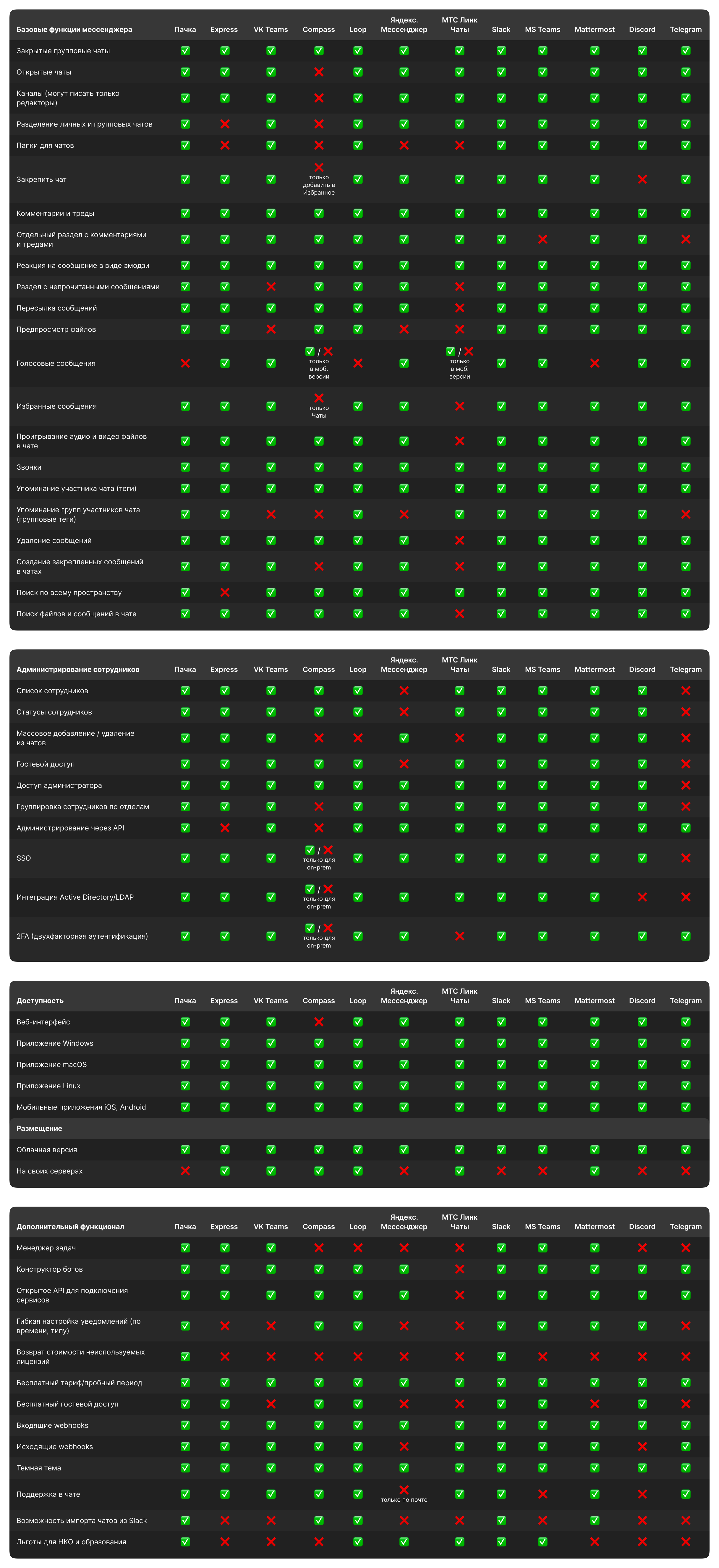
As before, below is a comparison table of the apps we covered in this post. We also have an updated comparison of team chat apps across 100+ criteria at this link 🙌
- Meta Platforms Inc. (Facebook, Instagram) declared extremist and banned in Russia.