n8n: what it is, how it works and 10 ready-made automations for your work chat
How automation works in n8n (nodes, workflows, templates, self-hosted and cloud), plus ten use cases that connect n8n to your team chat app.
Every day, someone on your team copies requests from a form into a spreadsheet, pastes leads from the CRM into the sales chat and manually reminds colleagues about their on-call rotations. Bots have been able to do this kind of work for a long time, and today the most popular way to build one without a developer is n8n. At Pachca, we built an official n8n node and went all the way from deployment to ready-made workflows. We turned that experience into this guide: what n8n is, how it works, how to run it in Russia and which automations to set up first.
What is n8n
n8n is a workflow automation platform: a visual builder where you assemble chains of actions from ready-made blocks, no code required. The name is pronounced "n-eight-n" and comes from "nodemation", short for node + automation. A workflow in n8n looks like a flowchart: an event happens, the data gets processed, an action runs. For example, an employee fills out a request form, n8n checks the fields and a ready-made message lands in the HR chat. Anything you used to do by hand following the same steps now runs on its own, triggered by an event or on a schedule.
Three things made n8n popular:
- More than a thousand ready-made integrations. The n8n catalog has over 1,000 nodes for popular services, from spreadsheets and CRMs to databases and team chat apps. For anything not in the catalog, there's the universal HTTP Request node, which can reach any service with an API.
- Self-hosting. You can deploy n8n on your own infrastructure for free, with every feature and no limit on the number of workflows. For Russian companies, this turned out to be the main selling point, and we'll explain why below.
- AI. n8n has nodes for language models and full AI agents, so a workflow can do more than move data between services. It can process data by meaning: summarize, classify, reply.
How n8n works: nodes and workflows
An automation in n8n is called a workflow, and its building blocks are called nodes. There are four types of nodes, and every workflow is built from a combination of them:
| Node type | What it does | Examples |
|---|---|---|
| Trigger | Starts the workflow | New message, submitted form, webhook, schedule |
| Action | Performs a specific step | Send a message, create a record, call an API |
| Logic | Controls the route | Conditions, branches, filters, loops |
| Data | Transforms what flows between nodes | Pick fields, change the format, merge sources |
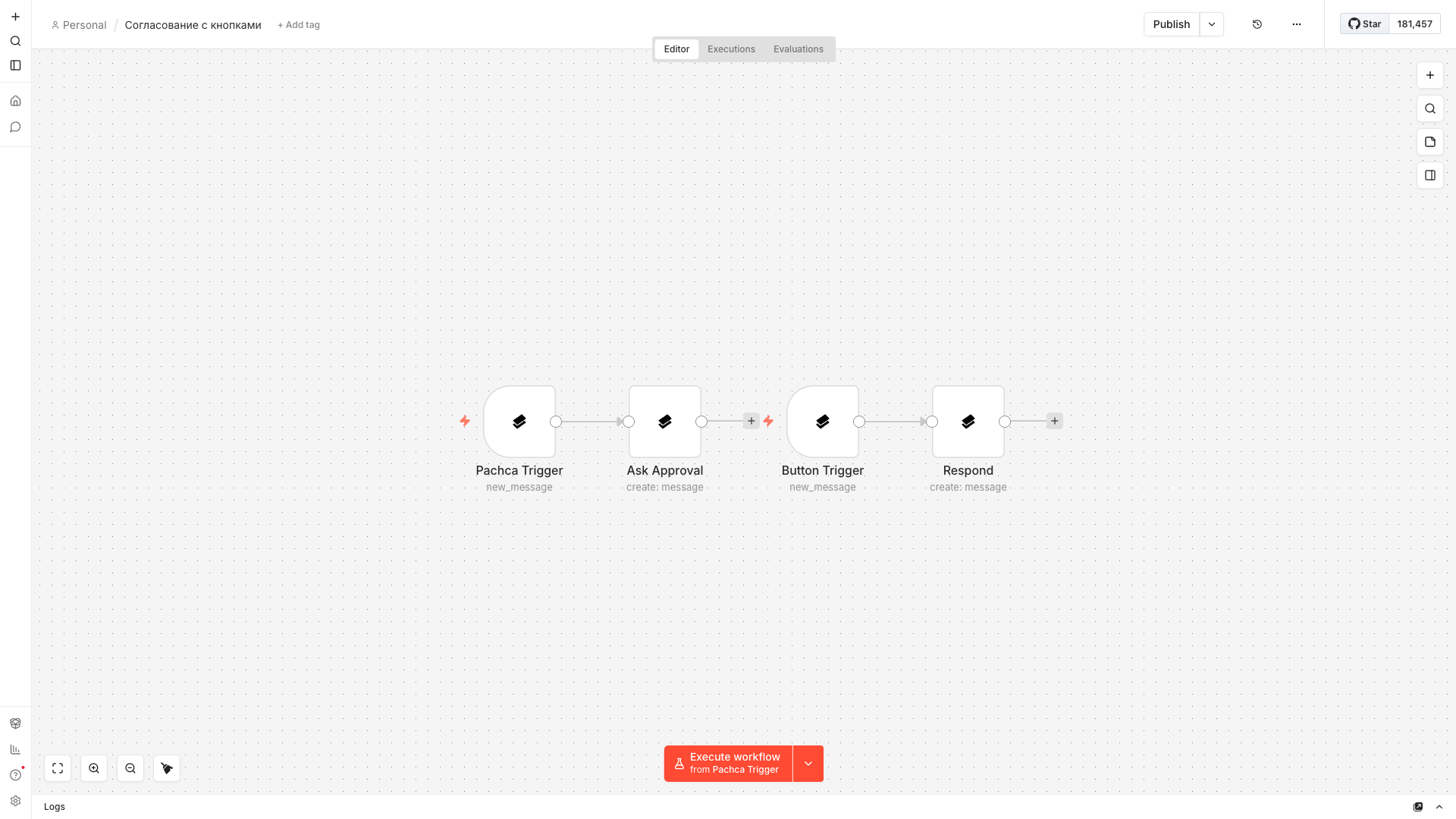
Data passes between nodes as JSON, and you can see it right in the interface: at every step, you can check exactly what came in and what went out, so debugging a workflow isn't guesswork. Besides the node canvas, the interface has two sections you'll need from day one:
- Credentials: a single store for keys and tokens from connected services, so you don't have to enter them in every workflow;
- Executions: a log of every run that shows when and at which step a workflow tripped up.
You don't need to code to get started: basic workflows come together with a few clicks. The template library helps too. It has thousands of ready-made workflows from the n8n team and community that you can use as a starting point and adapt instead of building from scratch. And when the ready-made nodes aren't enough, you can drop a node with your own code into the workflow. That's what sets n8n apart from "toy" builders: it grows with the complexity of your tasks.
How n8n differs from Zapier and Make
There are three key differences:
| Criterion | n8n | Zapier and Make |
|---|---|---|
| Cloud billing | Per full workflow execution, regardless of the step count | Per operation, so long chains get expensive fast |
| Self-hosting | Yes: free, every feature, no workflow limits | No, cloud only |
| Paying from Russia | Self-hosted needs no subscription and no foreign card | Paying for a subscription with a Russian card is tricky |
How much n8n, Zapier and Make cost
Prices as of late August 2026, with annual billing:
| Service | Free | Paid plans | Billing unit |
|---|---|---|---|
| n8n | Self-hosted, no limits | Cloud: from €20/mo for 2,500 executions, Pro: €50/mo for 10,000 | Full workflow execution, steps aren't counted |
| Make | 1,000 operations a month | From $12/mo for 10,000 operations, Pro: $21/mo | Every module operation |
| Zapier | 100 tasks a month | From $19.99/mo for 750 tasks | Every task, which is effectively every step |
You can't compare the numbers head to head, because the units are different. In Zapier and Make, every step of a workflow counts toward your limit: a five-step chain that runs a hundred times eats up 500 tasks. In n8n, those same hundred runs are a hundred executions, no matter how many steps are inside. So the difference is small for short workflows, but for long ones n8n is noticeably cheaper, and that's before you remember that the self-hosted version costs nothing.
That gives n8n two workable paths in Russia. Cloud n8n is the fastest start, with no server or setup, if you have a way to pay for the subscription, and the Pachca node is available there out of the box. Self-hosting is free and unlimited. For companies, it also means automation data like requests, messages and customer records never leaves their own infrastructure.
How to install n8n and get started
There are four ways to install n8n, and the right one depends on who you are and what you need:
| Method | What it is | Who it's for |
|---|---|---|
| n8n Cloud | The vendor's cloud, by subscription | The fastest start: sign up and build your first workflow in five minutes |
| Docker | A single container on your server, updates in a couple of commands | The recommended path for production use, deployed in under an hour |
| npm | A local install on your own computer | Trying out n8n without renting a server |
| Manual VPS | Full setup, from reverse proxy to backups | Maximum control for people who want to configure everything themselves |
n8n's requirements are modest: a small virtual machine is enough for a midsize team. From there:
- Build your first workflow. Start with something simple like "schedule trigger → message in a work chat". It'll make the logic of nodes clear in ten minutes.
- Browse the templates. The n8n library has thousands of ready-made workflows. Grab a couple for the services you use and adapt them. Reworking someone else's working workflow is much faster than building your own from a blank canvas.
- Connect your production services. CRM, task tracker, spreadsheets, forms, plus the team chat app where the results will land. Spotting a candidate for automation is easy: any process someone does by hand, following the same steps, at least once a week.
AI in n8n: from smart nodes to agents
AI is a big reason n8n has gotten so much attention over the past two years. It's built into the platform on four levels:
- LLM nodes. Plug in a provider key, and any step in a workflow can summarize text, classify a request, extract data from an email or draft a reply.
- RAG chains. The model answers based on your documents, like your knowledge base, policies and request history, instead of general knowledge from the internet.
- AI agents. A node that takes a task, decides on its own which tools to use and runs through a chain of steps without human input: pull data from a spreadsheet, analyze it with a model, save the result to a knowledge base and post a short takeaway in a work chat.
- MCP. A protocol for connecting external AI tools to n8n. You can also hand n8n workflows to an agent as tools.
At Pachca, we build a team chat app for people and agents. The AI agent lives right in threads: @mention it in a discussion, and it'll create a task in your tracker or read a file in your repository without anyone having to recap the context. We covered how it works under the hood in our article on the AI agent in a team chat app.
10 ready-made automations for your work chat
Almost every automation ends the same way: the result has to reach people. That's why a team chat app is the most common final node in a workflow. Requests, alerts, digests and reports land where your team already spends its day.
The seven workflows below come from our own practice and the Pachca node docs. Each one takes an evening to build, and the developer portal has ready-made JSON files for them: import the workflow into n8n, swap in your own Credentials and run it.
Welcoming a new employee
When someone is added to a chat, the trigger catches the event and the bot immediately sends a welcome message with useful links. The workflow is easy to extend: a direct message to the new hire, automatic adding to work chats.
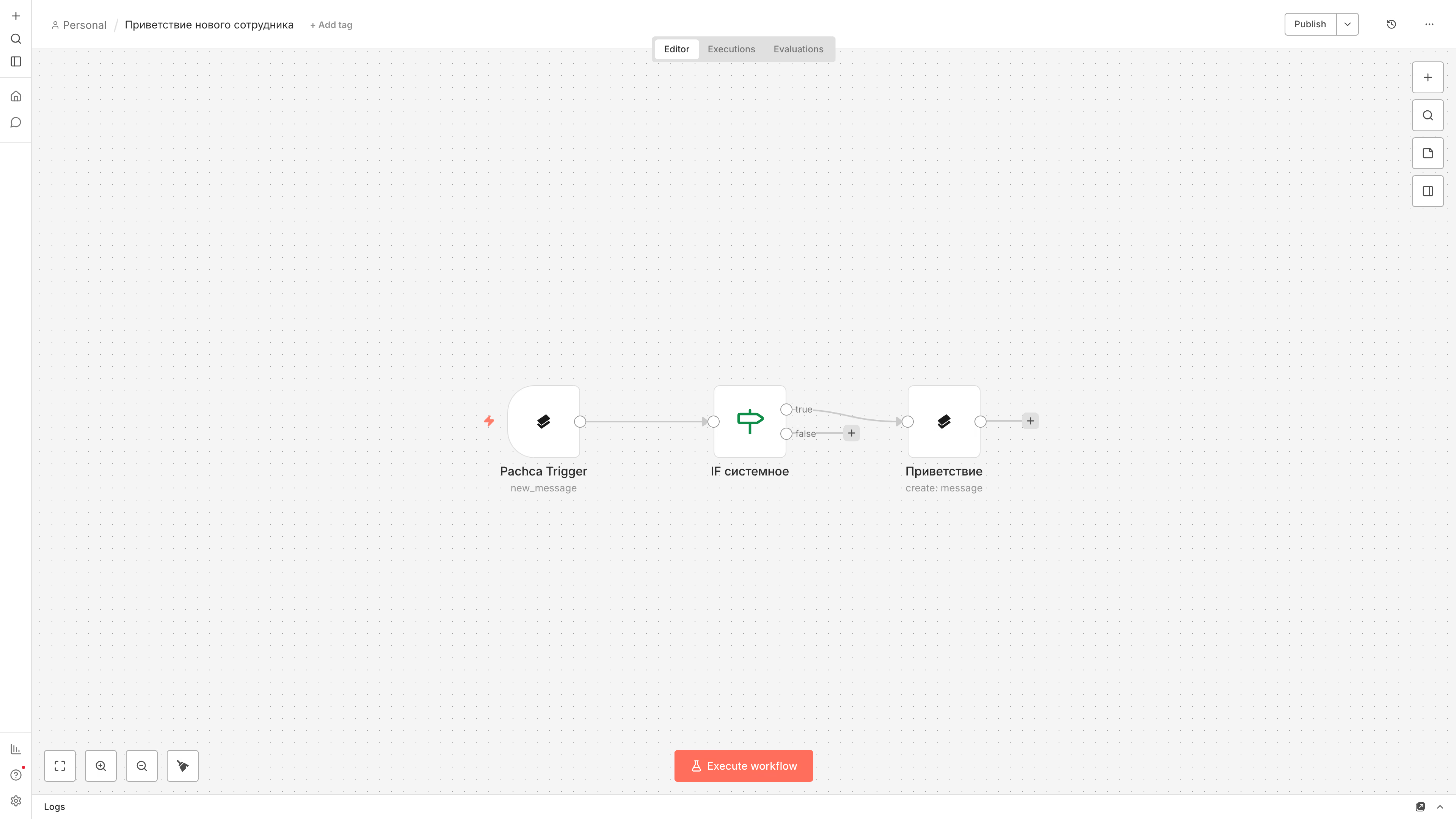
How it works: Pachca Trigger (Chat Member Added) → Pachca (Message: Create).
Forwarding messages between channels
Important news from one chat is automatically duplicated in another, with the author credited and a filter that drops service messages. Useful when an announcement needs to reach everyone but teams live in different chats.
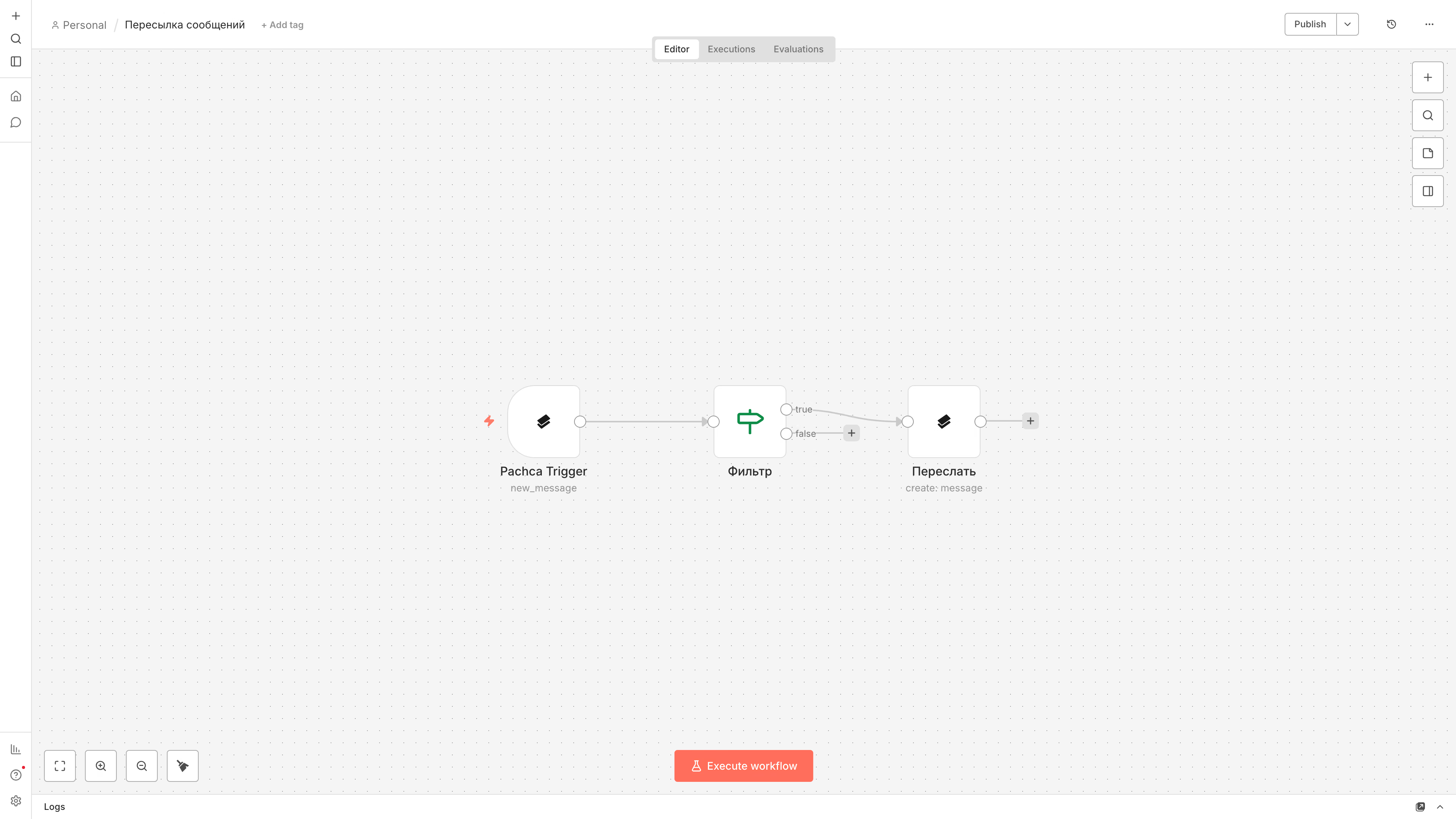
How it works: Pachca Trigger (New Message) → IF → Pachca (Message: Create).
Overdue task reminders
Every morning, the workflow pulls tasks from Pachca, filters out the overdue ones and sends the list to the team's chat, so standup starts with a ready-made agenda. You can add personal notifications to the assignees and group tasks by project.
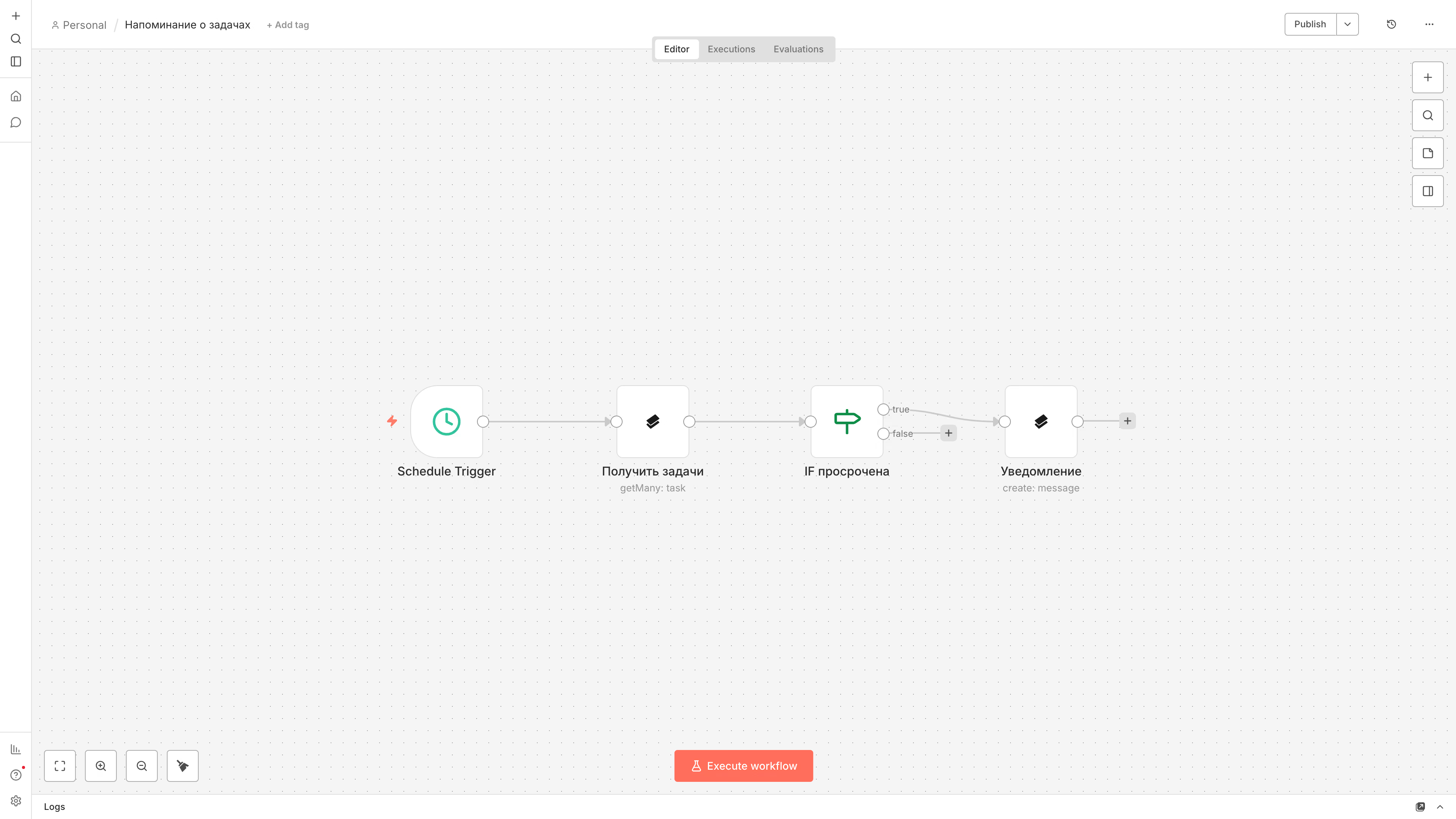
How it works: Schedule Trigger → Pachca (Task: Get Many) → IF → Pachca (Message: Create).
Monitoring and alerts
Every five minutes, n8n pings an external service, and if the status isn't 200 or a metric crosses a threshold, an alert lands in the monitoring chat. The incident discussion lives right in the thread under it, so in the morning you can see both what happened and what was decided.
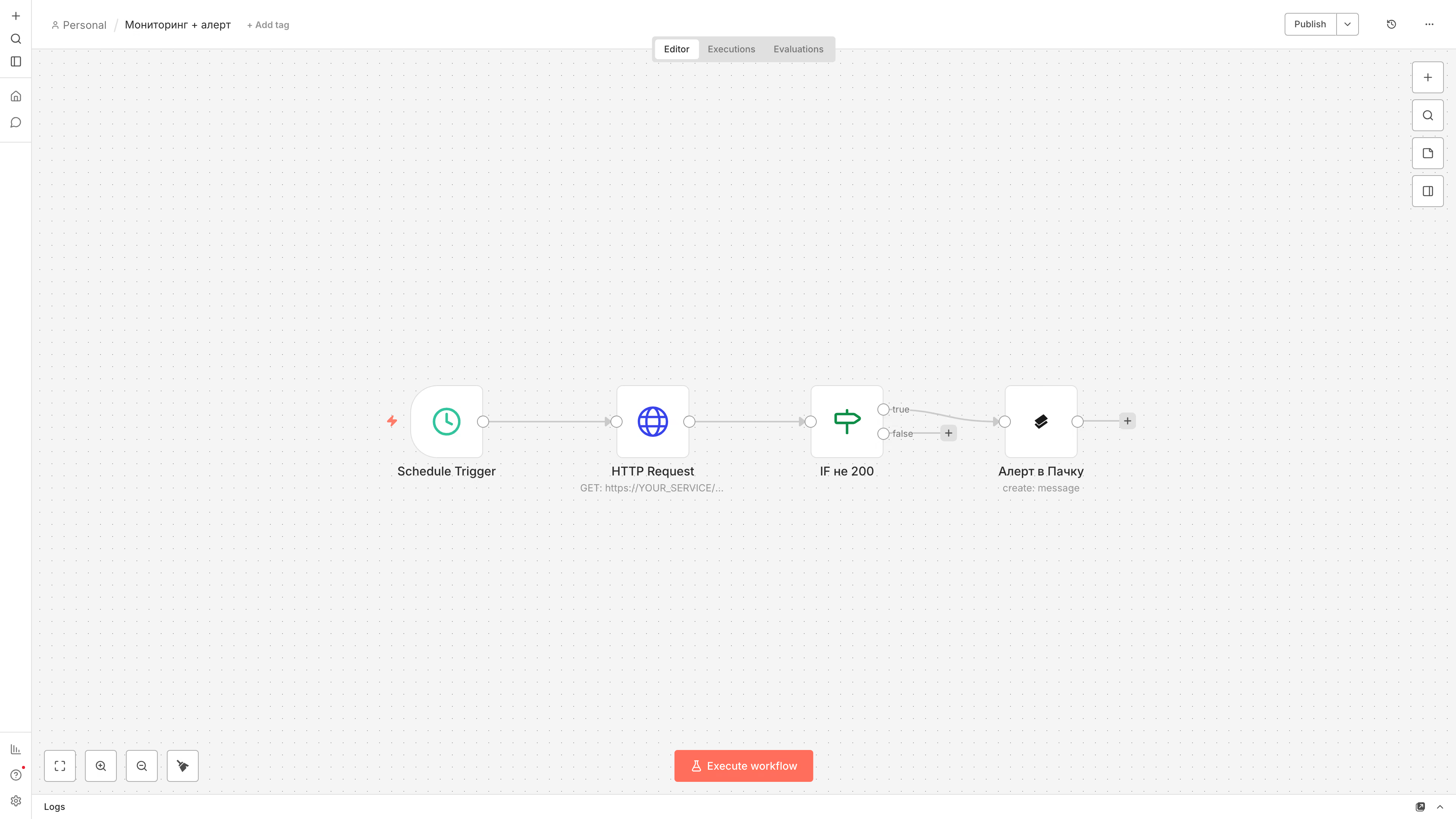
How it works: Schedule Trigger → HTTP Request → IF → Pachca (Message: Create).
Approvals with buttons
The request goes out as a message with "Approve" and "Reject" buttons. The click comes back to n8n as a Button Pressed event, Switch routes it, and the original message gets updated with the result, so the approval doesn't get lost in the conversation. This is the workflow open in the editor screenshot above.
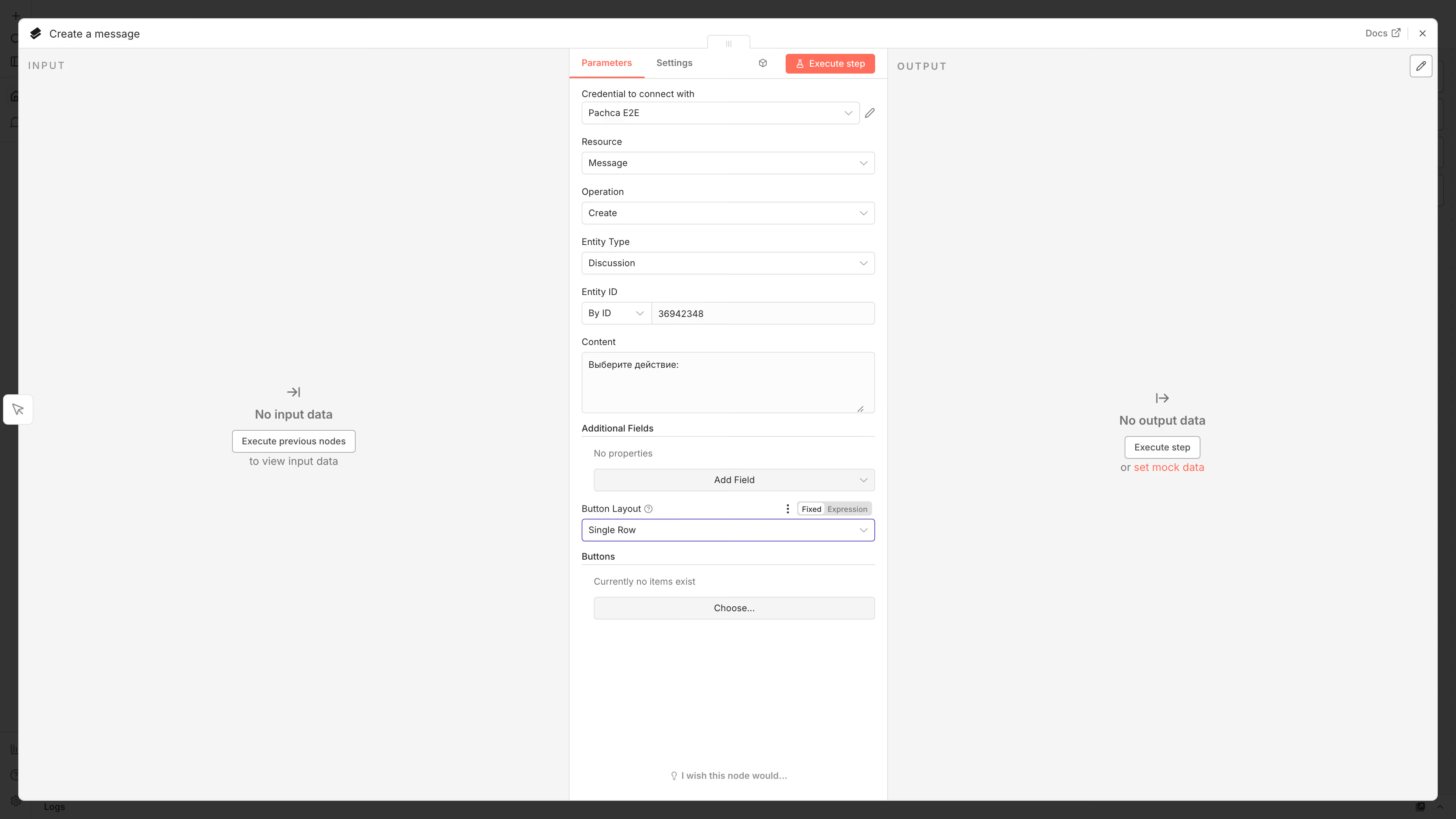
How it works: Message: Create with buttons → Pachca Trigger (Button Pressed) → Switch → Message: Update.
Vacation requests
The most complete workflow: an employee types the "/vacation" command, gets a message with a button, the button opens a modal form, and the completed request goes to their manager for approval in a thread. We walked through it step by step in a separate guide.
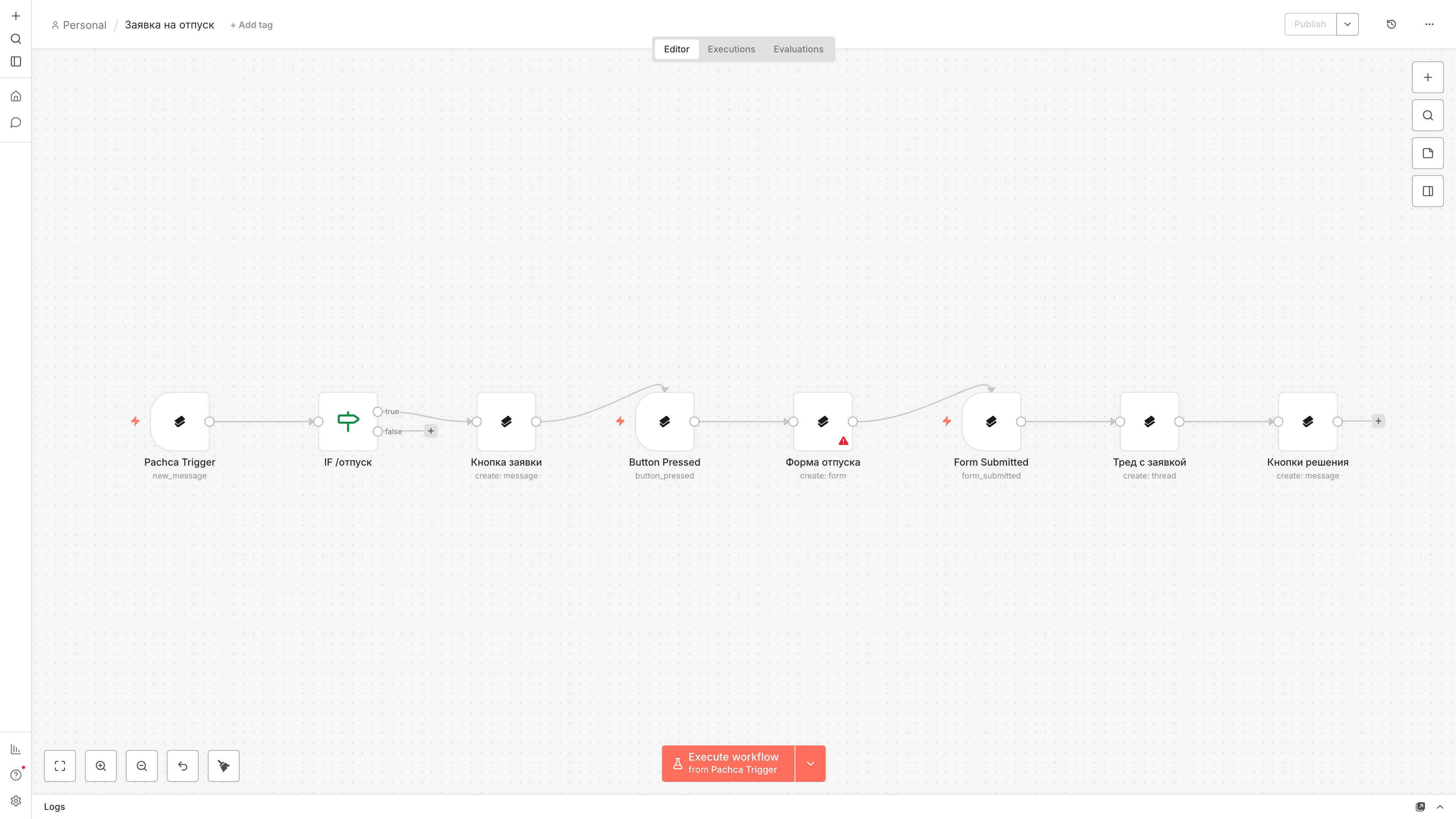
How it works: two workflows, one that takes the request through a form and one that handles approval in a thread.
AI assistant
A bot that answers questions about chat history: the AI Agent receives a message, finds context on its own through Pachca operations (message search is connected to it as a tool) and replies right in the chat. You'll need an LLM provider key configured in n8n.
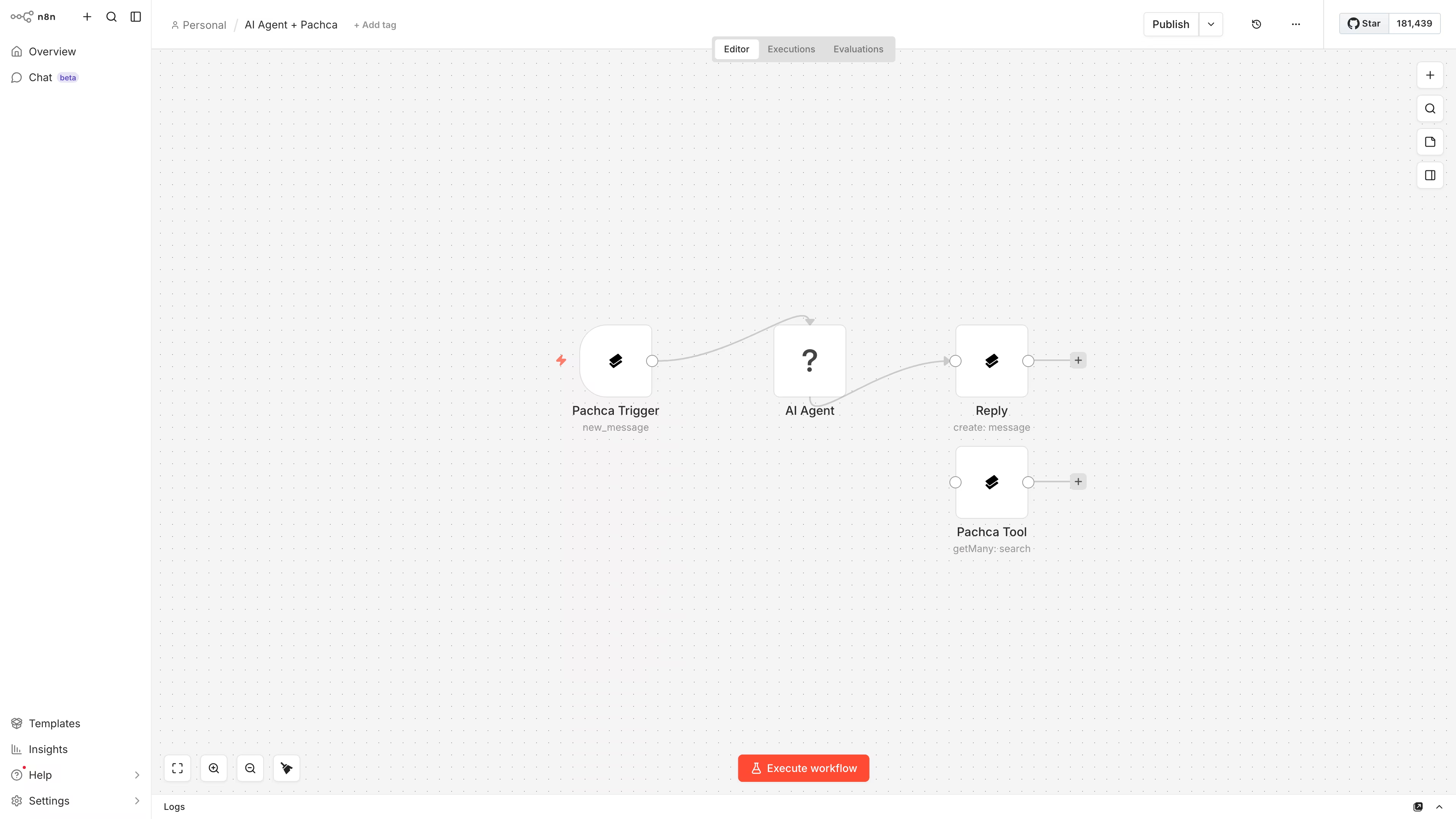
How it works: Pachca Trigger (New Message) → AI Agent (LLM) + Pachca as Tools.
Three more workflows without ready-made templates
- Leads from the CRM. A new deal or website request turns into a card with the amount and contact in the sales chat. Urgent ones @mention the owner.
- Release notes. A tag or merge in GitHub/GitLab becomes a clean post in the announcement channel, with no more reminding developers to "write up the announcement".
- Pulse surveys. Every two weeks, the bot sends the team a short survey, the answers go into a spreadsheet and the manager sees the trend.
What all ten have in common: each one removes a single recurring manual task. On its own, it's a small thing. Together, they add up to hours per team every week.
How to connect your team chat app to n8n
Pachca has an official node in the n8n catalog. Our team built it and n8n verified it. It's available out of the box in the cloud version, and in self-hosted n8n you install it as an extension. The node covers twelve API resources, including messages, chats and their members, threads, reactions, tasks, group tags, files and bots. It can add buttons and forms to messages, and Pachca Trigger starts workflows on events in Pachca: a new message, a button click, a submitted form, a reaction or a change in chat membership.
Connecting takes a couple of minutes: find Pachca in the nodes panel, install the extension and create Credentials with your bot token.
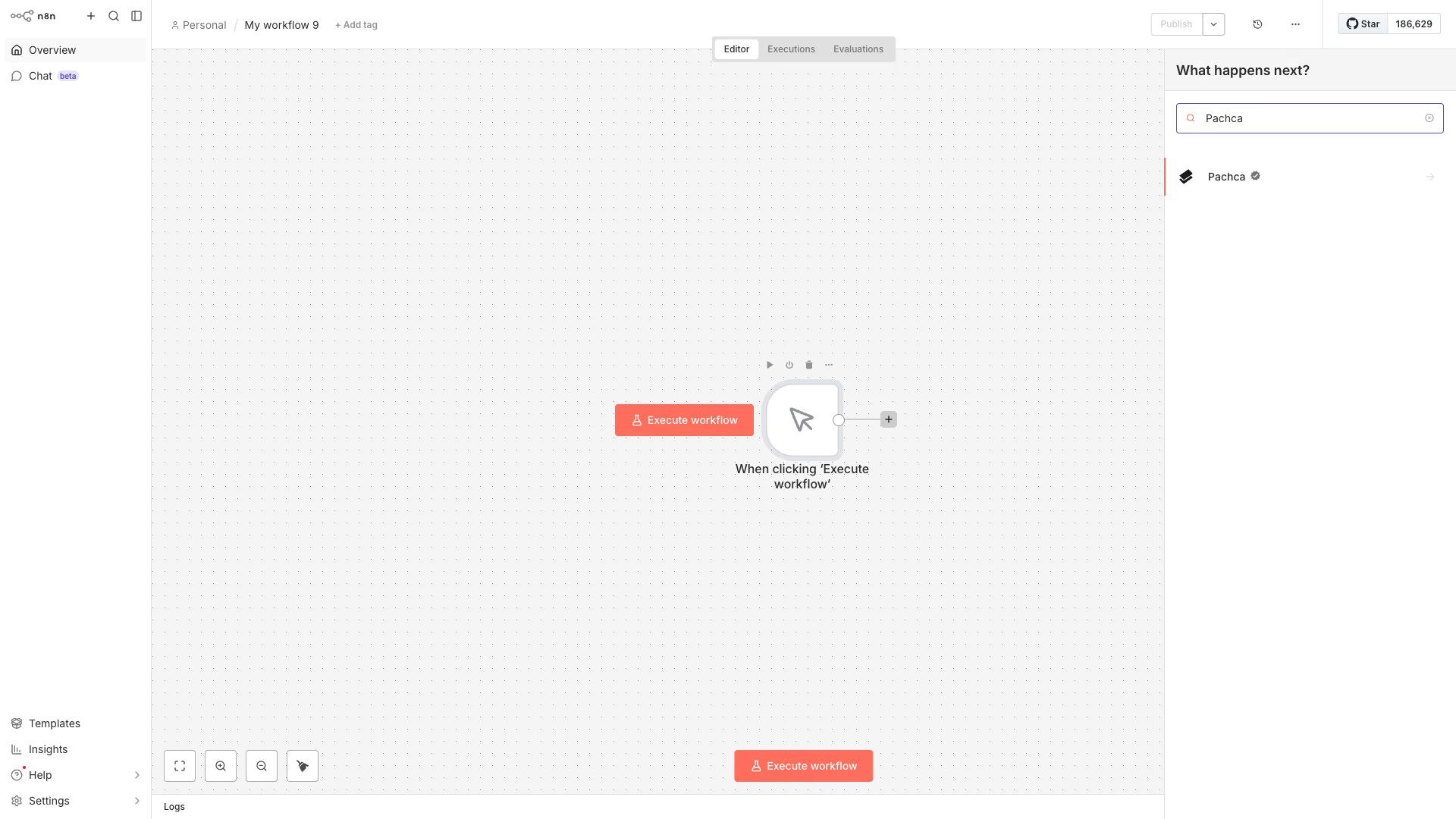
Step-by-step setup is covered in the Help Center and in the developer docs, which also include seven workflows broken down with ready-made templates, from welcoming new hires to an AI assistant. A nice bonus for AI workflows: the node's operations plug into the n8n AI Agent as tools, so the agent can search chat history and send replies on its own. And if the node is missing something, there's always the API: any method is available from n8n through the HTTP node with a token, the method URL and a JSON request body.
What to consider before rolling it out
A few honest caveats so your expectations match reality:
- Self-hosted needs maintenance. Updates, backups of the workflow database, monitoring. It's not a lot of work, but it's regular, and someone needs to own it. Otherwise, six months from now nobody will remember why a workflow broke.
- n8n is fair-code, not classic open source. You can use it freely inside your company. The restrictions only apply to reselling n8n as a service.
- Complex workflows take an engineering mindset. Clicking a chain together is easy, but designing a reliable process with error handling is a developer-level task. Start with simple workflows and add complexity gradually. That way, automation sticks instead of staying an experiment.
If your team's work communication already lives in a team chat app, n8n turns it into a control panel for your processes. Try the combo on one workflow: vacation requests take an evening to set up with our guide.
Frequently asked questions
It's an automation builder: you assemble an "event → processing → action" chain from ready-made blocks, and it runs on its own. For example: a form is submitted → the data is checked → a message lands in your work chat. You don't need to code for basic workflows.
The self-hosted version is free: you deploy n8n on your own server and get every integration with no limit on the number of workflows. The paid option is the cloud version by subscription, where the vendor runs the infrastructure. The license model is called fair-code: free use inside your company, with restrictions only on reselling n8n as a service.
Yes. Paying for a cloud subscription with a Russian card is tricky, but the self-hosted version needs no subscription and no foreign card: n8n deploys on your own server with Docker and runs fully on its own. Your data stays inside your company's infrastructure.
The main difference is self-hosting: you can deploy n8n on your own server for free, while Zapier and Make are cloud-only. Billing is different too: in n8n Cloud, you pay per full workflow execution, not per operation, so long chains cost less.
Not for basic workflows: you build them with clicks from ready-made nodes, and the template library has thousands of workflows you can use as a starting point. Code comes in handy for complex cases: custom data transformations, working with APIs that have no ready-made node and error handling.
Pachca has an official node in the n8n catalog: it's available out of the box in the cloud version and installs as an extension in self-hosted n8n. The node sends messages to chats and threads and works with forms and webhooks. Any other API method is available through the n8n HTTP node.